


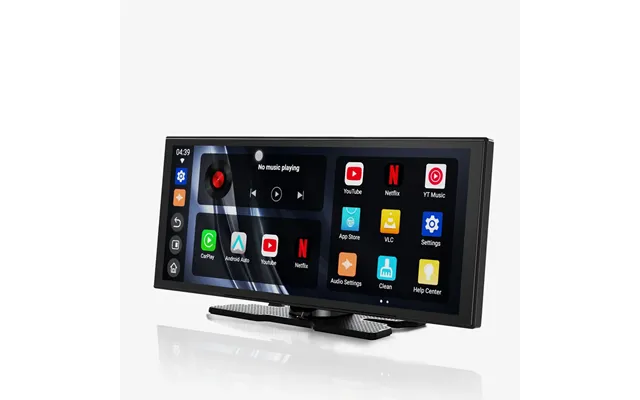
Ottocast price list
Last updated Wednesday, Sep 2, 2026
| Ottocast | Price |
|---|---|
| Play2video Ultra | $179.00 |
| Screenflow Portable Car Display Screen | $230.00 |
| Ottoaibox P3 Lite | $239.00 |
Loading...
Last updated Wednesday, Sep 2, 2026
| Ottocast | Price |
|---|---|
| Play2video Ultra | $179.00 |
| Screenflow Portable Car Display Screen | $230.00 |
| Ottoaibox P3 Lite | $239.00 |
Modern driving is no longer just about getting from one place to another. Your car has become a mobile office, music room, navigation center, and communication hub. That is why a smooth infotainment experience matters more than ever. Ottocast in the US helps drivers connect their smartphones to their vehicles with practical wireless adapters and car technology designed for everyday use.
If your car already supports wired Apple CarPlay or Android Auto, Ottocast products can help remove the cable from the equation. Instead of reaching for a cord every time you start the engine, you can often connect your phone automatically and enjoy a cleaner dashboard. It is a small change, but it can make every trip feel more convenient.
Ottocast offers several types of in-car accessories, including wireless CarPlay adapters, Android Auto adapters, video streaming devices, and selected entertainment products. The right choice depends on your vehicle, smartphone, driving habits, and the features you want. In this guide, we will explore the Ottocast store in the United States, explain what its products do, and show you what to consider before ordering.
Ottocast is a technology brand focused on improving the connected driving experience. Its products are made for people who want easier access to smartphone features while using their vehicle’s built-in screen. The brand is especially known for devices that convert wired smartphone connections into wireless ones.
Think of an Ottocast adapter as a bridge. One side connects to your vehicle, while the other side communicates with your phone. Once the connection is established, compatible features can appear on the car’s display without requiring a traditional data cable each time you drive.
The brand serves drivers who want to use navigation apps, music services, hands-free calling, messages, and voice assistants with less effort. Some Ottocast devices also support video applications when the vehicle is parked and the product is compatible with the required system. These features can be useful on road trips, during charging stops, or while waiting in the car.
The Ottocast US store is designed for customers in the United States who want to purchase car connectivity products online. Shopping through a regional store can make the buying process easier because product information, shipping details, and support options may be tailored to US customers.
Before placing an order, take a moment to review the product page carefully. Compatibility is the most important detail. A device may work with certain versions of Apple CarPlay or Android Auto but not with every vehicle screen. Your car might have a touchscreen that looks modern yet lack the wired connection needed for a wireless adapter.
Pay attention to the supported operating systems, connection method, vehicle requirements, and included accessories. Product pages may also list firmware update instructions, app support, and other technical information. Reading these details can prevent the most common shopping mistake: ordering a device that does not match your car.
Buying from an official US store can offer practical advantages. You may get pricing in US dollars, shipping options intended for domestic customers, and customer service that understands the local market. Warranty and return information may also be clearer than it is when purchasing from an unfamiliar international seller.
That does not mean every purchase will be identical. Shipping times, promotions, stock levels, and return terms can change. Always check the current information shown at checkout. A few minutes of research can save you from frustration later.
Ottocast has a broad selection of products, but most shoppers begin with one of several main categories. Understanding the difference between them makes the buying decision much simpler.
Wireless CarPlay adapters are made for vehicles that already support wired Apple CarPlay. The adapter plugs into the car’s compatible USB port and connects to an iPhone through wireless communication. After the initial setup, the phone may connect automatically when you start the vehicle.
This type of product is useful if you often make short trips. Without an adapter, you may leave your phone in your pocket and drive away, only to realize that you forgot to plug it in. Wireless access removes that extra step. You can keep the cabin tidy and still use navigation, calls, audio, and other supported features.
Keep in mind that a wireless adapter does not usually add CarPlay to a vehicle that never supported CarPlay in the first place. It normally changes the connection method from wired to wireless. That distinction is essential when you compare products.
Android phone users can look for wireless Android Auto adapters. These products are intended for compatible vehicles with wired Android Auto support. They can provide access to navigation, music, calls, voice controls, and other supported functions through the vehicle’s display.
Android Auto compatibility can depend on the phone model, operating system, vehicle system, and local software settings. Because Android devices vary more widely than iPhones, checking the product requirements is especially important. A quick review of the supported phone and vehicle list can answer many questions before you buy.
Some Ottocast products focus on multimedia. Depending on the model, these devices may help users access selected video or streaming functions through the car’s screen. They are often designed for use while the vehicle is parked, which is an important safety point.
Drivers should never watch videos while moving. A passenger may enjoy entertainment during a long wait, but the person behind the wheel needs to keep attention on the road. Responsible use protects everyone in the vehicle and supports safer driving habits.
Some devices are built to support both major smartphone platforms. These products may appeal to families or households where one person uses an iPhone and another uses an Android phone. They can also be convenient for people who switch between work and personal devices.
However, “all-in-one” does not always mean “works with every car.” Vehicle compatibility still matters. Review the exact requirements and connection process before assuming that a dual-platform device will fit your setup.
The basic setup is usually straightforward. First, you connect the adapter to the vehicle’s USB port used for wired CarPlay or wired Android Auto. Next, you pair your phone with the adapter using Bluetooth and wireless networking. Once pairing is complete, the vehicle may remember the device for future drives.
The first connection can take a little longer than later connections. That is normal. Your phone and adapter need to recognize each other and exchange the information required for communication. Afterward, the process may feel almost automatic, like turning on a lamp that already knows where the switch is.
Connection performance can be affected by several factors. Distance between the phone and adapter, wireless interference, phone settings, vehicle software, and other connected devices may all play a role. If the connection drops, restarting the phone, reconnecting the adapter, or checking for a firmware update may help.
Begin by parking the vehicle in a safe place. Insert the adapter into the correct USB port and wait for the device to power on. Open the Bluetooth settings on your phone, locate the adapter, and follow the pairing instructions shown on the vehicle screen or in the product guide.
Some models may use a companion application or a web-based update process. If an update is available, install it according to the manufacturer’s instructions. Firmware updates can improve compatibility, fix connection issues, or add support for newer phone software.
Once the system works, test several functions while parked. Try navigation, audio, calls, and voice commands. This small check helps you learn the controls before driving. It also gives you a chance to solve problems without dealing with them on the road.
The main benefit of an Ottocast product is convenience. You can reduce cable clutter, connect your phone more easily, and start using familiar smartphone features through the vehicle’s screen. For many drivers, that makes the daily commute feel less like a routine chore.
Cables can create a messy space around the gear selector, cup holders, and center console. They can also become tangled or fall between the seats. A wireless adapter helps keep the area more organized. The improvement may be modest, but a tidy cabin often feels calmer.
If your phone connects automatically, you can begin using compatible features soon after starting the car. You do not need to search for a cable or remember which end goes into the phone. That is particularly helpful when you are leaving for work, collecting children, or making several short stops.
Many drivers already have a capable display in the dashboard. Ottocast products can help you use that screen with compatible smartphone systems instead of relying only on the phone itself. Navigation directions become easier to view, and audio controls can be more convenient to reach.
Wireless connectivity can make long drives more comfortable. Passengers can help select music, adjust routes, or manage calls without constantly moving cables around. Some compatible multimedia products may also provide entertainment options during parked breaks.
The best Ottocast product is not necessarily the newest or most advanced model. It is the one that matches your vehicle and your actual needs. Start with compatibility, then compare features, setup, design, and price.
Find out whether your car supports wired Apple CarPlay, wired Android Auto, or both. You can check the vehicle manual, the manufacturer’s website, or the infotainment settings. If you are unsure, search for the exact make, model, model year, and trim level.
Trim levels can matter. Two vehicles from the same year may use different infotainment systems. A factory upgrade, replacement head unit, or regional variation can also change compatibility. Never rely only on the car’s brand name.
Confirm that your phone uses a supported operating system and that the required wireless settings are available. Some devices may work better with newer phones or updated software. If several people will use the adapter, check each phone rather than assuming that one successful connection guarantees another.
Most users want a device that connects quickly. Review customer feedback for comments about startup time, reconnection, and stability. A product with impressive features can become annoying if it takes too long to connect every morning.
The USB port may be located in a tight compartment or beside other controls. A compact adapter can fit more comfortably in small spaces. Consider where the device will sit and whether the included cable gives you enough flexibility.
Technology changes quickly. Phones receive new operating system versions, and vehicles can behave differently after software updates. A product with clear update instructions and accessible support may provide better long-term value than one that only looks attractive on the product page.
Wireless car technology is convenient, but no device is perfect in every vehicle. If your Ottocast adapter does not work immediately, do not assume it is defective. Many issues come from a simple setup problem.
Check that you are using the USB port designed for wired CarPlay or Android Auto. Some ports provide power only and cannot communicate with the infotainment system. Try the original phone cable in the same port. If wired service does not work there, a wireless adapter is unlikely to work either.
Turn Bluetooth and wireless networking off and on again. Remove old pairing records from both the phone and vehicle, then restart the setup. If another phone is nearby, temporarily disable its Bluetooth connection so the adapter does not attempt to connect to the wrong device.
Keep the phone in a location with a strong signal and avoid placing it under heavy objects or inside a metal compartment. Check whether the adapter has a firmware update. You can also restart the vehicle’s infotainment system and phone. If the problem continues, contact Ottocast support with your vehicle and phone details.
Read the exact message instead of immediately disconnecting everything. The error may point to an unsupported vehicle, cable issue, phone permission, or outdated software. A careful diagnosis is faster than randomly changing settings.
Convenience should never compete with attention. Set your route before moving, use voice controls when possible, and ask a passenger to manage entertainment. Do not handle the phone while driving. Even a quick glance can become a serious distraction.
Video functions require special care. Use them only when the vehicle is parked and local laws allow it. Never attempt to bypass safety restrictions designed to prevent moving-image playback while driving. The best technology is helpful, not distracting.
It is also wise to keep your phone charged on longer trips. Wireless connections can use more battery than a simple idle state. If your vehicle supports wireless charging, you may pair it with the adapter. Otherwise, keep a charging cable available for extended drives.
When you buy technology online, the experience does not end at checkout. Product guidance, shipping, updates, warranty terms, and customer support all matter. The official Ottocast US store can be a useful starting point because it brings product details and purchase information together.
Before ordering, review the return policy and warranty coverage. Check how long you have to request a return, whether the item must be in its original condition, and who pays return shipping when a product is not suitable. Policies can change, so use the current terms shown by the store.
Keep your order confirmation and packaging until you know the device works correctly. If you need support, provide clear information: vehicle make and model, model year, phone type, operating system version, adapter model, and a description of the problem. A short video or photo may also help explain a connection issue.
For drivers who already have wired CarPlay or wired Android Auto, Ottocast can be a worthwhile upgrade. The benefit comes from daily convenience rather than dramatic visual change. You are paying to simplify a task you repeat every time you drive.
It may not be the right choice for every driver. If you rarely use the vehicle’s infotainment system, do not mind connecting a cable, or have a car without compatible wired support, a wireless adapter may offer little value. In that case, a different head unit or another type of accessory may make more sense.
Think about your routine. Do you make several short trips? Do you often forget the cable? Do you want a less cluttered dashboard? Do multiple drivers share the car? If you answered yes to one or more of these questions, an Ottocast wireless product may fit naturally into your driving life.
Ottocast gives US drivers a practical way to modernize compatible vehicle infotainment systems without replacing the entire dashboard. Its wireless CarPlay and Android Auto adapters can reduce cable clutter, simplify phone connections, and make navigation, calls, and audio easier to access. Other products may offer additional multimedia functions for suitable situations.
The key is to choose carefully. Check your vehicle’s original capabilities, match the product to your phone, read the current store policies, and follow the setup instructions. When selected wisely and used responsibly, an Ottocast device can turn a small daily annoyance into a smooth, almost invisible part of every drive.