




View 7 Offers
View 7 Offers
Loading...
Modern laptops and tablets are often slim, stylish, and powerful—but they do not always offer enough ports. When you need to connect a keyboard, mouse, storage drive, monitor, memory card, or other accessory, a USB hub can act like a traffic controller for your setup. It gives you more connection options without forcing you to unplug devices every few minutes.
This guide explores the USB and USB-C hubs listed in the reference data, including compact four-port adapters, seven-port USB extensions, multi-port docking stations, and HDMI-ready hubs. Prices shown are the listed prices in the reference data, and ZoneOffer is a comparison site that helps you compare products rather than a store selling them directly.
A USB hub is useful when your computer has fewer available ports than your accessories require. Instead of connecting one device at a time, you can plug a hub into a compatible port and create a broader connection point for several peripherals.
Think of your computer’s ports as parking spaces. If the spaces fill up, a hub is like adding a nearby parking area. The right model can make a compact laptop more practical at a desk, support a cleaner workspace, or help you connect accessories while traveling.
The products in this selection vary considerably. Some focus on basic USB expansion, while others add HDMI output, memory-card readers, USB-C power delivery, or storage support. Your best choice depends on the devices you plan to connect and the type of port already available on your computer or tablet.
USB-C hubs are designed for devices equipped with a compatible USB-C port. The listed options include a four-port USB-C hub, an 8-in-1 USB-C docking station, and a Thunderbolt 3-compatible USB Type-C hub with HDMI support.
USB-C models can be especially convenient for modern laptops and tablets because one connection may provide access to several additional ports. However, the exact capabilities depend on the host device. A USB-C port may support data, display output, charging, or a combination of these functions, so checking your device specifications is important before choosing a hub.
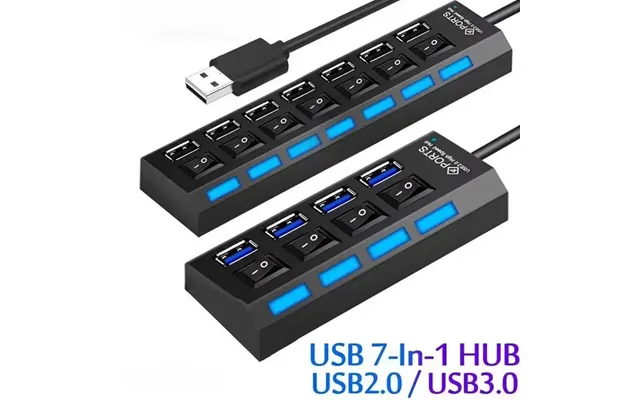
Traditional USB hubs are useful when your computer already has a suitable USB port and your main goal is to connect several USB accessories. The reference data includes a seven-port USB 3.0 hub and a seven-port USB 2.0 extension hub.
These models may suit desktop users, laptop owners, or anyone who regularly connects multiple USB devices. The difference between USB 2.0 and USB 3.0 matters when transfer speed is important, particularly with external storage or large files.
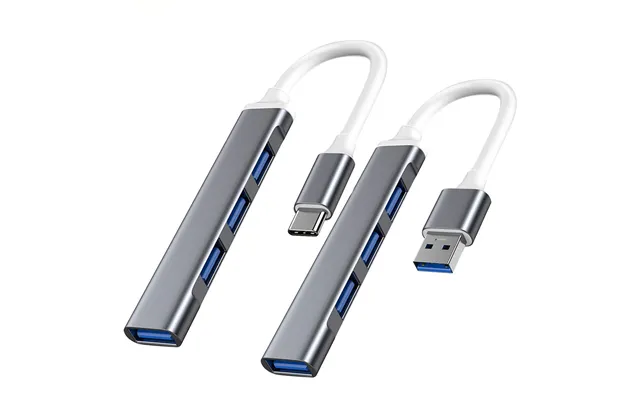
The USB-C Hub 3.0 Type-C 3.1 four-port multi-splitter adapter is listed at $10.17 through Voghion. Its description identifies it as a four-port USB-C hub intended for computers and accessories, with compatibility references including Xiaomi, Lenovo, and MacBook Pro models.
This type of hub is a straightforward option for users who need additional USB connections without a larger docking station. Four ports can be enough for a keyboard, mouse, USB drive, and another accessory, depending on your setup.
Its compact format may appeal to people who move between locations. A small hub can slip into a laptop bag more easily than a larger desktop accessory. If you need display output, memory-card slots, or charging features, however, you may want to compare it with one of the more feature-rich options listed below.
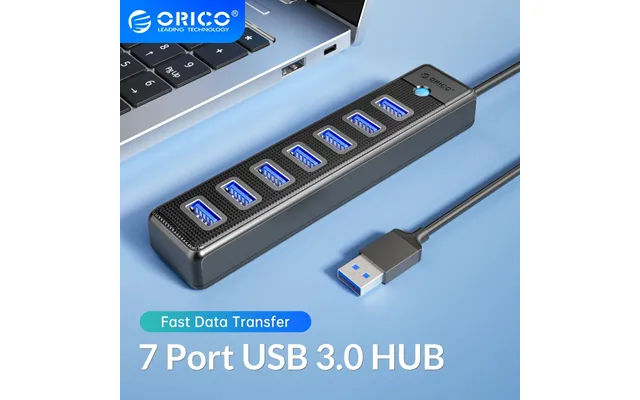
The Orico USB 3.0 seven-port hub is listed at $18.61 through Voghion. The product description presents it as a high-speed notebook extension for computers and laptops, giving it a clear focus on expanding USB connectivity.
Seven ports provide more room for a busy workstation. You could use a hub of this size for several everyday peripherals, such as input devices, storage accessories, or other USB equipment. The number of ports can reduce the need to swap cables whenever your setup changes.
USB 3.0 is also relevant when you work with compatible devices that need faster data movement than USB 2.0. Still, the actual experience depends on the connected device, the computer’s port, and the type of files being transferred. A hub cannot make every connected device operate beyond its own supported standard.
The seven-port switch computer USB extension hub is listed at $13.64 through Voghion. Its description identifies it as a USB 2.0 splitter for PCs, laptops, and desktop computers.
This model may be worth considering when your priority is adding more USB connections rather than maximizing transfer performance. Seven ports can be helpful for a stationary desk where several accessories stay connected throughout the day.
USB 2.0 is generally a better match for basic peripherals than for demanding high-speed storage tasks. Before selecting this model, consider how you use your ports. If you mainly connect simple accessories, its seven-port layout may be more valuable to you than a smaller hub with a newer transfer standard.
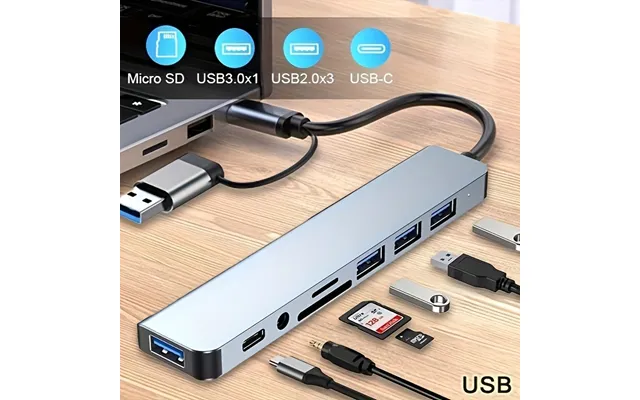
The space-saving 8-in-1 USB hub with an audio jack is listed at $14.78 through Voghion. The reference data describes it as USB-powered, operating at 5 volts, and compatible with tablets.
The addition of an audio jack makes this model different from a basic port splitter. It may appeal to tablet users who want a broader set of connections in a compact accessory. The 8-in-1 design also suggests a focus on combining several functions into one small device, although the reference data does not specify every port included.
Because the product is USB-powered, it draws operating power through USB rather than being described as a separate powered desktop unit. Check the requirements of your connected accessories before buying, especially if you plan to attach several power-hungry devices at the same time.
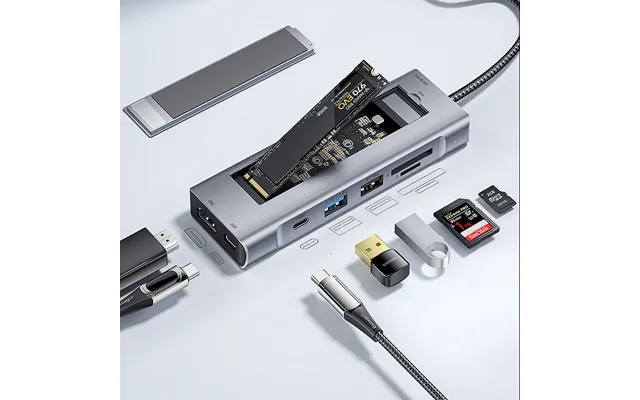
The Essager 8-in-1 docking station is listed at $49.99 through Banggood.Com. It is described as an 8-in-1 Type-C docking station with a gray aluminum alloy and ABS construction.
This is the most feature-packed product in the listed selection. Its described connections include USB 2.0, USB 3.2 Gen 2, USB-C data, USB-C power delivery up to 100 watts, 4K 30Hz HD output, SD and TF card readers, and an M.2 card slot.
The USB 3.2 Gen 2 USB-C data connection is described with a transmission rate of up to 10 Gbps. That can make this type of dock attractive for transferring large files, videos, and photos when the connected equipment also supports the relevant standard.
The dock’s 100-watt USB-C power delivery capability may be useful when you want to charge a compatible device while using connected peripherals. Charging performance depends on the host device, charger, cable, and other equipment, so the maximum listed figure should not be treated as a guarantee for every setup.
The 4K 30Hz HD output is another notable feature. It is designed for connecting a compatible external display or monitor. The reference data specifies 4K at 30Hz, so users should compare that detail with their preferred display resolution and refresh requirements.
Photographers, content creators, and users with removable storage may appreciate the built-in SD and TF card reader slots. The M.2 card slot adds another storage-related function, making this dock more like a compact command center than a simple USB splitter.
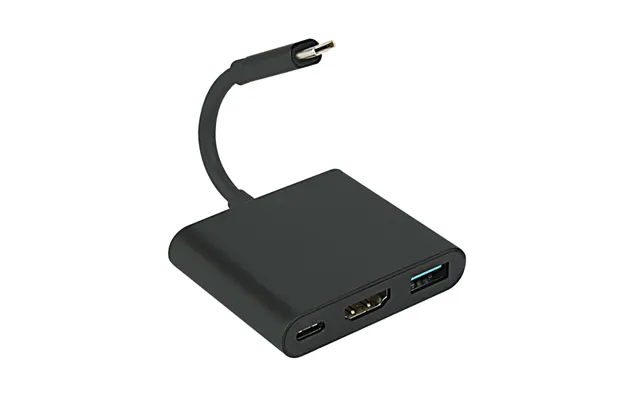
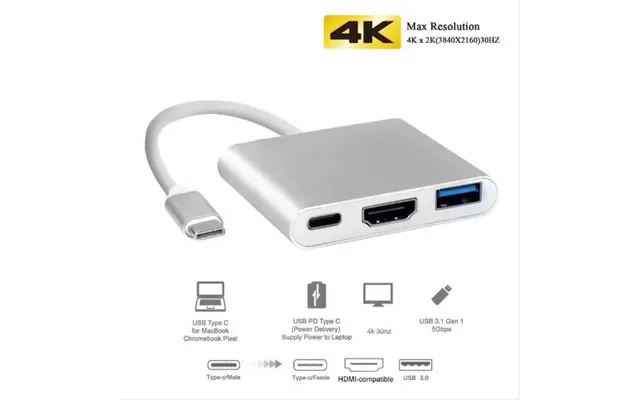
The 3-in-1 multi-port 1080p and 4K HDMI adapter is listed at $10.40 through Voghion. Its description references a USB-C HDMI converter, Type-C hub, and compatibility with devices such as the Switch, PS4, and TV box.
This model may suit users who want a simple way to connect a compatible USB-C device to an HDMI display. The listing mentions both 1080p and 4K support, but display performance depends on the source device, screen, cable, and connection requirements.
A 3-in-1 adapter can be a practical middle ground. It offers more functionality than a single-purpose cable while remaining less complex than a full docking station. If you do not need card readers, several USB ports, or high-wattage charging, a smaller HDMI-focused adapter may be easier to carry and use.
The Thunderbolt 3 USB Type-C hub with HDMI-compatible 4K support is listed at $7.05 through Voghion. The product description also references Samsung DeX mode, a USB-C dock, and power delivery for MacBook Pro and MacBook Air models from 2021.
This option is aimed at users who want display connectivity and USB-C hub functionality in one accessory. The Thunderbolt 3 reference may be important for people whose computers support that standard, while the Samsung DeX mention may interest compatible Samsung users.
Compatibility is the key consideration here. A product can use a USB-C connector while offering different capabilities depending on the device and port. Before purchasing, confirm whether your computer or phone supports the required display mode, Thunderbolt features, HDMI output, or power delivery functions.
The listed products include USB 2.0, USB 3.0, and USB 3.2 Gen 2 connections. These standards are not interchangeable in terms of speed, even though they may use familiar USB-style connections.
USB 2.0 can be suitable for basic peripherals such as keyboards, mice, and similar accessories. USB 3.0 is a stronger fit when you plan to move files or use compatible storage devices. The Essager dock goes further by listing USB 3.2 Gen 2 and a 10 Gbps transmission rate.
Here is the simple way to think about it: if your accessories are carrying small streams of data, a basic connection may be enough. If they are moving large rivers of photos, videos, or documents, a faster standard becomes more important. The slowest part of the chain—including the computer, hub, cable, and device—can affect the result.
Port count is one of the easiest features to compare. The reference products range from a 3-in-1 adapter and a four-port hub to seven-port and 8-in-1 designs.
A four-port model may be enough for a lightweight laptop setup. A seven-port hub can make more sense for a fixed desk with several accessories. An 8-in-1 docking station is better suited to users who want multiple connection types rather than only additional USB sockets.
Try listing the devices you use every day. Add your keyboard, mouse, storage, display, headset, memory card, and charging needs. Then leave some space for future accessories. A hub should feel like an organized toolbox, not a puzzle where every port is occupied immediately.
Several products in the reference data include HDMI-related features. The 3-in-1 adapter mentions 1080p and 4K HDMI support, the Essager docking station lists 4K at 30Hz HD output, and the Thunderbolt 3 hub references HDMI-compatible 4K support.
Display compatibility involves more than the word “4K.” Your computer must support video output through the relevant port, while the monitor, cable, and adapter must also support the desired resolution and refresh rate. For the Essager dock, the listed output is specifically 4K at 30Hz.
If your goal is presentations, streaming, or a larger desktop workspace, HDMI support may be a decisive feature. If you only need USB accessories, paying attention to video specifications may add unnecessary complexity.
Power features vary across the selection. The Essager docking station lists USB-C power delivery up to 100 watts, while the space-saving 8-in-1 hub is described as USB-powered with a 5-volt operating voltage.
These descriptions point to different priorities. A dock with power delivery may help compatible devices receive power while peripherals are connected. A USB-powered hub is designed to operate through USB power, which can support a compact and convenient setup.
Do not assume that every port can charge every device at the same rate. Check the requirements of your laptop, tablet, phone, and accessories before relying on a hub for charging. Compatibility is the bridge between a promising specification and a successful everyday setup.
The listed prices range from $7.05 for the Thunderbolt 3 USB Type-C hub to $49.99 for the Essager 8-in-1 docking station. Other options include the four-port USB-C hub at $10.17, the 3-in-1 HDMI adapter at $10.40, the seven-port USB 2.0 hub at $13.64, the space-saving 8-in-1 hub at $14.78, and the Orico seven-port USB 3.0 hub at $18.61.
Price alone does not tell the whole story. A low-cost adapter may be ideal if you need only a few additional connections or basic display support. A higher-priced dock may offer more value if you specifically need card readers, M.2 storage support, 100-watt power delivery, and multiple data standards.
Use the listed price as a starting point, then compare the features you will actually use. A port you never connect is like a spare key for a door you do not have—it may sound useful, but it does not improve your daily routine.
For a compact laptop arrangement, the four-port USB-C hub is a simple starting point. For a desk with many USB accessories, the Orico seven-port USB 3.0 hub or the seven-port USB 2.0 extension hub may be more appropriate.
For tablet users seeking a compact accessory with audio support, the space-saving 8-in-1 hub is worth comparing. For monitor connectivity, the 3-in-1 HDMI adapter or the Thunderbolt 3 USB-C hub may be more relevant.
For the broadest collection of listed functions, the Essager 8-in-1 docking station stands apart with its USB-C data connection, 100-watt power delivery, 4K 30Hz HD output, card readers, and M.2 card slot. The right choice depends on whether you need a simple extension or a complete connectivity station.
The best USB or USB-C hub is the one that matches your devices, workflow, and available port. A compact four-port adapter can solve a basic connectivity problem, while a seven-port hub can support a fuller desk setup. HDMI adapters add display flexibility, and the Essager docking station brings together data, charging, video, memory-card, and storage features. Compare port type, transfer standard, display support, power features, and price before choosing. With the right hub, your computer setup can feel less like a crowded drawer and more like a well-organized control panel.