






Keyboard Trays & Platforms
Loading...
Loading...
A well-planned workspace can make everyday computer use feel smoother. Keyboard trays and platforms help you think about where your keyboard, accessories, and other equipment belong, turning a crowded desk into a more comfortable working area. Whether you work from home, manage office equipment, or are comparing accessories for a professional setup, choosing the right product starts with understanding the details.
ZoneOffer is a comparison site designed to help you review available products and value in one place. It is not a store, so product purchases, stock status, and order details should always be confirmed through the listed seller. In the reference data for this category, one item is presented: the NEC BE116519 SL2100 60-button DSS Console BK.
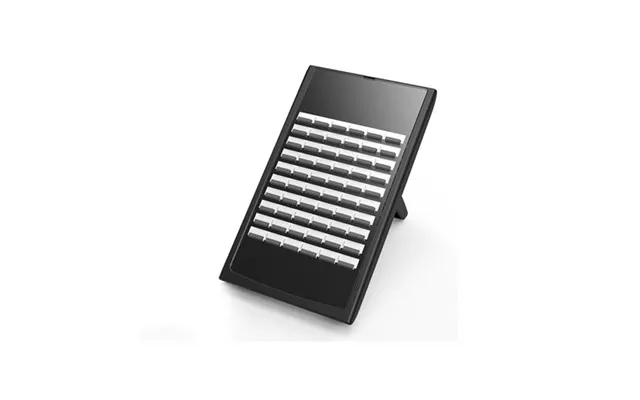
The listed product is the NEC BE116519 SL2100 60-button DSS Console BK. Its name identifies it as a 60-button DSS console rather than a conventional under-desk computer keyboard tray. That distinction matters because a communications console and an ergonomic keyboard platform serve different purposes.
The product description states that the console includes 60 user-programmable function keys. It also lists accessories and expansion modules as available features. These details may appeal to users who need a dedicated control surface for a compatible communications setup rather than a simple platform for a standard computer keyboard.
Before making a decision, ask yourself what you really need: a sliding surface for typing, a raised keyboard platform, or a programmable console with multiple controls? That simple question can prevent a mismatch between your workspace and the equipment you select.
The reference data gives the NEC console dimensions as 4 inches by 11 inches by 8 inches. Its listed weight is 3 pounds. These measurements can help you estimate how much space the unit may occupy on or around your workstation.
The product is identified under the NEC brand, and the listed seller is The Twister Group. The price shown in the reference data is $195.12. No regular price is provided, so there is no supported basis for describing the listing as discounted or comparing it with a previous price.
Here is a concise summary of the supplied details:
Product: NEC BE116519 SL2100 60-button DSS Console BK
Brand: NEC
Features: 60 user-programmable function keys, accessories, expansion modules
Dimensions: 4 inches by 11 inches by 8 inches
Weight: 3 pounds
Listed seller: The Twister Group
Listed price: $195.12
A keyboard tray is usually intended to hold a computer keyboard at a convenient position, often beneath or beside a desk surface. A platform may provide a stable area for a keyboard or related equipment. These products are generally selected for workspace arrangement and typing comfort.
A DSS console, on the other hand, is designed around programmable buttons and communication-related controls. The NEC listing specifically highlights its 60 function keys, accessories, and expansion modules. That makes it important to compare the product’s purpose with your own equipment before placing an order.
Think of the difference like choosing between a serving tray and a control panel. Both can sit near your workspace, but they solve completely different problems. The right option depends on whether your priority is physical keyboard placement or access to programmable functions.
Programmable keys can be useful when a user needs quick access to repeated commands or assigned functions. Instead of relying only on menus or remembering complex sequences, a dedicated button layout can place important controls within reach.
The NEC console is described as having 60 user-programmable function keys. That is the central feature highlighted in the reference data. If your work depends on a large number of frequently used commands, a high-button-count console may be worth investigating.
However, the usefulness of those keys depends on compatibility with the intended communications system. The supplied information does not identify specific systems, software, or devices supported by the console. For that reason, you should verify compatibility before treating the programmable layout as a guaranteed fit for your setup.
The listing states that accessories and expansion modules are available features. This suggests that the console may be relevant to users who want more than a fixed, basic control layout. Expansion capability can be valuable when a workspace or communications environment may grow over time.
Still, the reference data does not specify which accessories or expansion modules are included, nor does it list separate compatibility requirements. Do not assume that every possible add-on comes with the product. Instead, review the listing carefully and confirm what is included before buying.
This is especially important when comparing a professional console with general computer accessories. A keyboard tray may be judged mainly by its mounting method and usable surface, while a console may require more attention to system integration and available accessories.
The listed dimensions are 4 inches by 11 inches by 8 inches, with a weight of 3 pounds. These measurements provide a starting point for planning placement. Measure your intended area and compare it with the product dimensions before making a decision.
Space planning is easy to overlook. A product can appear compact in a listing but still compete with monitors, phones, paperwork, or other controls once it reaches your desk. Use a tape measure and mark out a 4-inch by 11-inch by 8-inch area to visualize how the unit may fit.
Weight also matters when choosing a mounting or support solution. The supplied information does not describe a mounting system, desk attachment, sliding mechanism, or installation method. Therefore, buyers should not assume that the console is designed to attach to a particular keyboard tray or desk.
Start by identifying the main job the product must perform. Are you trying to improve typing posture, save desk space, organize controls, or add programmable functions? A clear goal makes comparison much easier.
Next, check the physical requirements. Compare the listed 4-inch by 11-inch by 8-inch dimensions with the available space in your setup. Also consider the 3-pound weight and whether your planned surface or support can accommodate it.
Finally, examine system compatibility. The supplied description does not provide a list of supported systems or detailed installation information. Those missing details are not necessarily a problem, but they are questions you should resolve before purchasing.
The reference data identifies the item as a 60-button DSS console, not as a traditional sliding keyboard tray. While it may be used near a computer workstation, the supplied information does not say that it is intended to hold a standard computer keyboard or improve typing posture.
If your goal is ergonomic keyboard placement, look carefully for details such as tray width, adjustment range, mounting style, and keyboard support. Those specifications are not provided for this NEC console, so it should not automatically be treated as a conventional ergonomic tray.
The 60 user-programmable function keys may be relevant to a communications-focused environment. The mention of accessories and expansion modules also indicates that the console is built around a feature-rich control setup.
Whether it suits your workspace depends on compatibility and the functions you need. Because the reference data does not identify a specific system or installation method, confirm those points with the seller before relying on the console for professional use.
The NEC BE116519 SL2100 60-button DSS Console BK is listed at $195.12. This is the only price supplied in the reference data. No discount, sale period, shipping charge, tax amount, or availability status is provided.
That means the price should be viewed as the listed comparison value, not as a guaranteed final checkout total. Seller pages can contain additional information that is not included in a comparison record. Review the current listing before completing a purchase.
ZoneOffer helps shoppers compare products and displayed values, but it does not sell the item. The listed seller is The Twister Group, so details such as ordering, stock, and fulfillment should be checked through that seller’s listing.
When comparing the NEC console with keyboard trays or platforms, avoid judging products by price alone. First compare purpose. A tray designed for keyboard placement should be evaluated differently from a programmable DSS console.
Then compare measurable details. The NEC listing gives dimensions, weight, button count, brand, and feature information. If another product does not provide similar specifications, it may be harder to determine which item fits your workspace best.
Compatibility is another major checkpoint. A product with many buttons may look impressive, but extra controls only help when they work with the equipment and tasks you already use. In contrast, a basic keyboard platform may be more suitable when your only goal is to create a dedicated typing surface.
Before choosing a product, clear the area where you plan to place it. Remove temporary clutter and identify nearby equipment that cannot be moved. This gives you a realistic picture of how much room is available.
Measure the space in inches, then compare it with the listed product dimensions. Leave room for cables and hand movement where appropriate, but do not assume a particular cable arrangement because the reference data does not describe one.
It also helps to separate essential features from attractive extras. For the NEC console, the 60 programmable keys are a central feature. Accessories and expansion modules are also mentioned, but the data does not provide further details. Focus first on the functions you know you need.
A good buying decision combines product purpose, physical fit, compatibility, and price. The NEC console offers a clearly stated button count and includes listed support for accessories and expansion modules. Its dimensions, weight, brand, seller, and listed price are also available for comparison.
At the same time, several practical details are not supplied. The reference data does not describe a keyboard tray mechanism, desk mounting method, supported systems, included accessories, shipping, or availability. Treat those as verification points rather than filling the gaps with assumptions.
When you compare products this way, shopping becomes less like guessing and more like assembling a puzzle. Each specification gives you one piece of the picture, while compatibility and workspace measurements show whether the pieces actually fit.
The NEC BE116519 SL2100 60-button DSS Console BK stands out in the supplied category data for its 60 user-programmable function keys, listed accessories and expansion modules, 4-inch by 11-inch by 8-inch dimensions, 3-pound weight, and $195.12 listed price. Because it is identified as a DSS console rather than a standard keyboard tray, compare its purpose carefully with your workspace needs. Use ZoneOffer as a comparison resource, then confirm current product details with The Twister Group before making a purchase.