

Wireless Presenters price list
Last updated Monday, Nov 9, 2026
| Wireless Presenters | Price |
|---|---|
| Av Access Eshare W50 4k Wireless Presentation System W Byod & Usb 3 | $699.00 |


Loading...
Last updated Monday, Nov 9, 2026
| Wireless Presenters | Price |
|---|---|
| Av Access Eshare W50 4k Wireless Presentation System W Byod & Usb 3 | $699.00 |
A strong presentation depends on more than attractive slides. You also need a reliable way to move through your content, share information, and keep your audience focused. Wireless presenters can help create a smoother experience by giving you more freedom than a traditional wired control device. Whether you are speaking in a conference room, teaching a class, or joining a hybrid meeting, the right presentation technology can act like an invisible bridge between your ideas and your audience.
In the current comparison data, one notable option is the AV Access eShare W50 4K Wireless Presentation System with BYOD and USB 3.0. Listed at $699 from AV Access, this product is designed for wireless presentation and hybrid conference use. ZoneOffer is a comparison site, so the listing is useful as a starting point for evaluating the product and comparing available options rather than treating the site as a store.
A wireless presenter is a presentation control or sharing solution that helps you manage content without depending entirely on a physical cable. Traditional presentation setups can feel restrictive: the presenter may need to stay beside a computer, pass a remote around, or pause while switching between devices. Wireless tools aim to make the process more flexible.
The phrase “wireless presenter” can describe several types of technology. Some products focus on slide control, while others support broader wireless presentation functions. A wireless presentation system may allow users to bring their own devices, connect through supported interfaces, and share content in a meeting environment. That broader approach is especially relevant when several people need to participate.
Imagine your presentation as a conversation rather than a speech from behind a desk. You may want to move closer to a display, speak with a group, or change position while keeping the session moving. Wireless technology can support that more natural style by reducing dependence on a single fixed connection.
Still, the best choice depends on your setup. Think about the devices people use, how often different presenters need access, and whether your meetings include remote participants. Those questions can help you decide whether a simple wireless control device or a more complete wireless presentation system is the better fit.
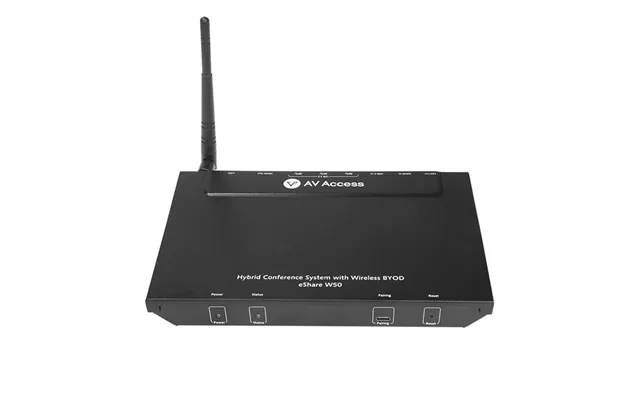
The Av Access eShare W50 4K Wireless Presentation System is the featured product in the supplied data. Its description identifies it as a 4K wireless presentation system with BYOD and USB 3.0 support for hybrid conference use. The listed brand is eShare W50, while the store listed in the offer is AV Access.
The product is shown at a price of $699. The reference data does not provide a regular price, discount percentage, rating, shipping information, or availability status, so those details should not be assumed. If you are comparing presentation solutions, the listed price gives you a clear starting point for considering whether the system fits your technology budget.
4K support is one of the key features named in the product listing. In practical terms, resolution matters when your presentation includes detailed visuals, text-heavy slides, diagrams, product images, or video. A clearer image can make content easier for viewers to follow, particularly when the display is large or the room includes people seated farther away.
However, image quality is only one part of the experience. The devices used by presenters, the display, the network environment, and the content itself all influence how a presentation feels. A high-resolution system can be valuable, but it should be evaluated alongside compatibility and ease of use.
The eShare W50 description includes BYOD support, meaning “bring your own device.” This feature is relevant in workplaces and meeting spaces where participants may use different computers or mobile devices. Instead of relying on one shared presentation computer, a BYOD-focused setup is intended to make participation more flexible.
Why is that useful? A team member may need to share a document from a laptop, a presenter may want to switch to another device, or a guest speaker may arrive with their own equipment. A system built around BYOD can help support those situations. It is similar to having a shared stage where several speakers can step forward without rebuilding the entire setup each time.
Before choosing a wireless presentation system, make a list of the devices commonly used in your meetings. Consider whether presenters bring their own laptops, whether visitors need access, and whether the meeting room uses a permanent display. You should also review the technical requirements provided by the manufacturer or seller before making a purchase.
The reference data confirms BYOD support for the eShare W50, but it does not list every compatible operating system, device type, application, or connection method. For that reason, you should verify the exact compatibility details that matter to your organization instead of assuming that every device will work in the same way.
USB 3.0 is another feature named in the product description. USB connections are widely used in modern technology, and including USB support can be helpful when presentation equipment needs to interact with compatible accessories or devices. The exact role of the USB connection depends on the system design and the manufacturer’s specifications.
When reviewing a product with USB 3.0, look beyond the label. Ask what the port is intended to do, what accessories it supports, and whether it contributes to the workflow your team actually uses. A feature is most valuable when it solves a real problem, such as simplifying device connections or supporting a particular presentation routine.
It helps to sketch your meeting room workflow before you compare products. Where does the display sit? Which devices will presenters use? Do presenters need to switch between content sources? Will the system be used for in-person sessions, hybrid conferences, or both?
These questions can reveal whether a wireless presentation system is suitable for your environment. They can also prevent a common mistake: selecting a product because its feature list looks impressive without checking how those features fit your daily habits.
The supplied description states that the eShare W50 is intended for hybrid conference use. Hybrid meetings bring together people in the room and participants joining remotely, so the presentation setup needs to support a shared experience. Content must be visible to the room while also fitting into the remote meeting workflow.
A wireless presentation system can be part of that setup, especially when several people need to contribute content. Picture a meeting as a bridge: one side is the physical room, and the other side is the remote audience. Presentation technology helps carry the visuals across, but the complete experience also depends on the meeting platform, microphones, cameras, displays, and room design.
Good hybrid meetings benefit from clear roles and simple transitions. Decide who will share content, who will manage the meeting platform, and how speakers will move from one presenter to another. A wireless system may help reduce unnecessary cable changes, but your process still matters.
Before an important session, test the planned workflow with the devices and content you expect to use. This is not a claim about the specific performance of the eShare W50; it is a sensible preparation step for any presentation technology. A short rehearsal can expose compatibility questions before the audience arrives.
When comparing wireless presenters, start with the purpose of the product. Do you need simple slide navigation, wireless content sharing, or a system for collaborative meetings? The term “wireless presenter” covers different solutions, so defining the job comes first.
Next, review the features that directly support your workflow. For the Av Access eShare W50, the listed highlights are 4K wireless presentation, BYOD support, USB 3.0, and use in hybrid conferences. Those features may appeal to organizations that want a broader presentation system rather than a basic handheld remote.
Convenience is important, but compatibility comes first. A product that does not fit your display, devices, or meeting routine may create more work instead of less. Check the manufacturer’s current specifications for supported connections, software requirements, display needs, and setup steps.
The supplied data does not provide a full technical specification sheet for the eShare W50. Therefore, buyers should treat the product description as an overview rather than a complete installation guide. Confirm any detail that affects your purchase before committing funds.
A presentation system should make sense to the people who use it. If several employees, instructors, or guest speakers will operate the equipment, consider how quickly they can understand the workflow. Simple habits, clear instructions, and a prepared meeting process can make a major difference.
Ask yourself a practical question: will the system help presenters focus on their message, or will it distract them with complicated steps? The answer depends on your environment and the final setup, so a product demonstration or technical review may be useful when available.
The eShare W50 offer in the reference data is listed at $699. This price can help you establish a comparison point when reviewing wireless presentation products. It is important to remember that a purchase decision should not be based on price alone. The value of a system depends on how closely its features match your needs.
For example, an organization that regularly holds hybrid conferences may place greater importance on wireless sharing, BYOD functionality, and display quality. Another user may need only basic slide control and may not require a full presentation system. Comparing the product’s stated purpose with your actual use case is the best way to judge whether the listed price makes sense for you.
The supplied offer does not include a regular price, discount, customer rating, shipping information, return details, or availability status. Those items should not be inferred from the listing. They may change over time, and you should check the current offer information before making a purchase decision.
ZoneOffer provides comparison information rather than acting as the store. The listed store for this offer is AV Access. Keeping that distinction clear helps you understand where product information comes from and where to verify current purchase details.
A wireless presentation system may be considered for conference rooms, team meetings, training sessions, classrooms, demonstrations, and hybrid events. The right use case depends on the equipment already installed and the people who need to share content.
The eShare W50 is specifically described for hybrid conference use, so that is the clearest supported application in the available data. You might also evaluate it for other presentation environments, but you should confirm that the system’s specifications match those settings before relying on it for an important event.
In a conference room, presenters often need to switch between speakers and devices. BYOD support may be relevant when participants bring their own laptops or need to share content without using a single central computer. The goal is a meeting that feels organized rather than interrupted by repeated cable changes.
In training sessions, different instructors or participants may need to contribute information. A wireless presentation workflow can support that collaborative style, provided the room’s equipment and device requirements are compatible. Planning remains essential, especially when multiple people will present in one session.
Even the most capable presentation technology cannot replace preparation. Organize your slides, confirm your display connection, and decide who controls the presentation at each stage. If several people will share content, agree on the order beforehand.
Keep a backup plan as well. That might mean having presentation files available on an approved backup device or knowing how to continue the discussion if a connection needs attention. The specific backup method will depend on your organization’s equipment and policies, but the principle is simple: do not let one technical step carry the entire meeting on its shoulders.
Test the entire path from presenter device to audience display and remote participants. Check the content you plan to show, not just a blank screen. Images, video, detailed charts, and text-heavy slides can behave differently, so use realistic materials during your rehearsal.
For the eShare W50, the available information confirms 4K wireless presentation, BYOD, USB 3.0, and hybrid conference positioning. It does not confirm every setup detail, so use the manufacturer’s documentation to complete your testing plan.
The Av Access eShare W50 is worth considering if you are looking for a wireless presentation system with the specific features named in the listing: 4K support, BYOD functionality, USB 3.0, and a focus on hybrid conferences. Its listed price is $699, giving you a clear benchmark for your comparison.
Whether it is the right choice depends on your room, devices, meeting style, and budget. It may be more suitable for an organization seeking a broader presentation solution than for someone who only wants a basic slide remote. Review the complete technical information and current offer details before deciding.
Wireless presentation technology can help meetings feel less tied to cables and more focused on collaboration. The Av Access eShare W50 stands out in the supplied data as a 4K wireless presentation system with BYOD and USB 3.0 support for hybrid conference use, listed at $699 from AV Access. Use those details as a starting point, compare the system with your real workflow, and verify current specifications before purchasing. With the right preparation, your presentation setup can become a quiet support system that keeps attention where it belongs: on your ideas.