

Printer Consumables price list
Last updated Wednesday, Oct 14, 2026
| Printer Consumables | Price |
|---|---|
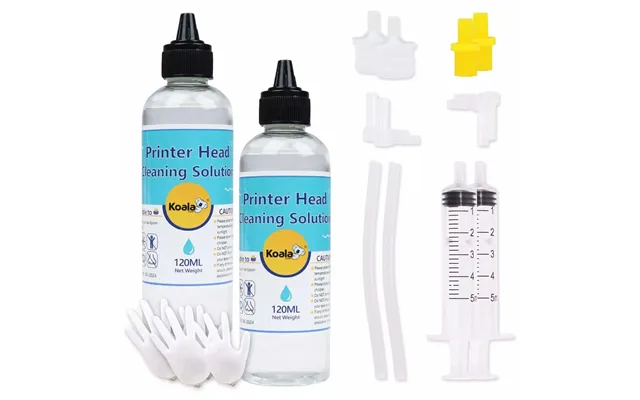
| Any Printer Cleaning Kit 240ml Unlock Print Head Nozzle Cleaner Solution | $14.99 |





Loading...
Last updated Wednesday, Oct 14, 2026
| Printer Consumables | Price |
|---|---|
| Any Printer Cleaning Kit 240ml Unlock Print Head Nozzle Cleaner Solution | $14.99 |
Clear, consistent prints often depend on more than fresh ink. Inside every inkjet printer, tiny nozzles guide ink onto the page. When dried ink or residue blocks those paths, your printer may produce streaks, missing colors, faded areas, or uneven text. A dedicated printer cleaning kit can help you address that buildup before it turns into a bigger maintenance headache.
The A-SUB X Koala Printer Cleaning Kit is one option to compare if you need a nozzle cleaner for compatible inkjet equipment. Listed at $14.99 through A-SUB, the kit provides approximately 8.1 fluid ounces of cleaning solution, along with tools intended to make application easier. ZoneOffer is a comparison site, not a store, so you can use the product information here to evaluate whether this type of printer consumable suits your setup.
A printer cleaning kit is designed to help remove dried ink and residue from areas involved in ink delivery. Think of the printer’s print head like a set of very small pipes. If ink dries inside those channels, the flow can become restricted. A cleaning solution helps loosen that buildup so ink can move more freely through the nozzles.
The A-SUB X Koala kit is described as a print head and nozzle cleaning solution. Its stated purpose is to help clear clogged nozzles and improve ink flow. That makes it especially relevant when your printer produces streaky output or when certain parts of an image fail to appear properly.
Cleaning kits are not the same as ink cartridges or refill bottles. They are maintenance products rather than printing supplies. You use them to help restore the path that ink travels through, while ink remains the material used to create the actual document or image.
The listed product is titled “Any Printer Cleaning Kit 240ml Unlock Print Head Nozzle Cleaner Solution.” Since the supplied product information gives the capacity as 240 milliliters, that equals approximately 8.1 fluid ounces. The listing identifies the brand as A-SUB X Koala and the seller as A-SUB.
The price shown in the reference data is $14.99. No regular price is provided, so it is best to view this as the listed comparison price rather than assume a markdown or discount. The product description says the kit includes a cleaning syringe, tubing, and instructions, giving you several components for applying the solution without needing separate tools.
The solution is described as suitable for dye, pigment, sublimation, and refill inks. The listing also states that it is formulated for Epson inkjet printers and works with most Epson EcoTank, Expression, WorkForce, and Stylus series printers. Because printer compatibility can depend on the specific model and maintenance method, checking your equipment before use remains a sensible step.
The product description also mentions DTF printers. However, the clearest compatibility information supplied focuses on Epson inkjet families and several ink types. If you use a specialized printer, compare the manufacturer’s guidance with the product details before applying any cleaning fluid.
Inkjet printers rely on fine openings to place ink precisely on paper or other media. Over time, ink can dry around or inside those openings, especially when the printer is used infrequently. A printer that sits unused may be more vulnerable to dried residue than one that prints regularly, although the exact cause can vary.
Different ink formulations can also leave different types of buildup. The A-SUB X Koala description specifically references dye, pigment, sublimation, and refill inks. This broad range may make the kit worth considering when you work with more than one ink type, but the product listing does not promise identical results for every printer or every blockage.
Environmental conditions, ink age, and the printer’s internal design may also affect print quality. When your pages develop lines, gaps, or inconsistent color, the problem could involve a blocked nozzle, low ink, an incorrect setting, or another printer issue. Cleaning is one possible maintenance step, not a guaranteed solution for every print defect.
Streaky prints are one of the clearest signs that ink is not reaching the page evenly. You may notice horizontal lines across photos, broken text, or white gaps in areas that should be filled. A color might also appear weak even when the ink supply itself has not run out.
Another clue is a missing section of a color pattern during a nozzle check. Many printers offer built-in maintenance functions that print a test pattern. If the pattern contains breaks, cleaning may be worth investigating. A printer’s own software cleaning cycle can be a useful first step, while a manual cleaning kit may be considered when routine maintenance does not solve the issue.
Before using any solution, rule out simple causes. Confirm that the correct cartridge or ink system is installed, check the visible ink level, and make sure the print settings are appropriate for the paper. Sometimes a small setting change is the real fix. Why use a deep-cleaning product when the issue is simply the wrong media setting?
The kit contains 240 milliliters of solution, equivalent to about 8.1 fluid ounces. According to the listing, that capacity is intended to support multiple deep cleanings. This may appeal to users who maintain a printer over time rather than looking for a single-use treatment.
A larger supply can also be practical if you manage more than one compatible printer or if an initial cleaning does not fully clear residue. Still, the number of uses will depend on the cleaning method, the condition of the print head, and how much solution each maintenance session requires.
The included syringe and tubing are designed to support direct application. These tools can help you control the amount of cleaning solution and guide it toward the relevant area. The kit description also states that instructions are included, which may make the process more approachable for someone handling printer maintenance for the first time.
Use care whenever a cleaning liquid is applied near electronic components. Follow the included directions and any applicable printer guidance. The goal is to loosen residue, not flood the printer. A careful, measured approach is like turning a faucet slowly instead of opening it full force.
The product description says the solution is compatible with dye, pigment, sublimation, and refill inks. That gives the kit a wide stated range of use. If your workflow includes different ink systems, this feature may be more useful than a cleaner aimed at only one formulation.
Compatibility claims should still be viewed alongside your printer model and manufacturer instructions. “Universal” language in a listing does not replace checking the specific equipment you own. When in doubt, compare the printer family, ink type, and recommended maintenance procedure before proceeding.
The reference data identifies the A-SUB X Koala cleaner as suitable for most Epson EcoTank, Expression, WorkForce, and Stylus series printers. These names cover several Epson inkjet families, but “most” does not mean every model. Printer designs can differ, and a solution that suits one model may not be appropriate for another.
Start by locating your printer’s exact model number. It may appear on the front, top, rear, or side of the machine, depending on the design. Then compare that model with the product details and the instructions supplied with the kit. This simple check can help reduce the chance of choosing an unsuitable maintenance product.
The description also calls the cleaner suitable for “any printer” while providing more specific references to Epson products. Because the most detailed compatibility information concerns Epson inkjet printers, those references should receive particular attention during your comparison.
Price is one factor, but it should not be the only one. The A-SUB X Koala kit is listed at $14.99, and its approximately 8.1-fluid-ounce capacity, included syringe, tubing, and instructions add context to that figure. A lower upfront price is not automatically better if the product does not suit your printer or ink type.
Compatibility should come first. Next, consider the solution volume and included accessories. A kit with application tools may be more convenient than a bottle that requires you to find a compatible syringe separately. Also consider whether the product description addresses the type of ink used in your printer.
It is equally important to separate confirmed information from assumptions. The reference data identifies the brand, seller, listed price, capacity, intended applications, and included tools. It does not provide customer ratings, a warranty, delivery details, or a guaranteed success rate. A careful comparison leaves those points open rather than filling the gaps with guesses.
Before starting, gather the printer model information, the kit instructions, and a clean work area. Protect the surface from ink or solution, and keep paper towels or another suitable absorbent material nearby. You want the process to feel controlled, not like a race against a leaking pen.
Review the instructions before opening the printer or applying fluid. If the printer has a built-in nozzle check or cleaning function, you may wish to use that diagnostic option first. It can confirm whether the issue appears to involve missing nozzle lines or uneven output.
Make sure you understand where the solution is meant to go. The included tubing and syringe are tools for directed application, not invitations to place liquid anywhere inside the machine. Follow the kit’s directions closely, and avoid forcing components or applying pressure beyond what the instructions describe.
The product description says the kit is intended to be easy to apply and includes detailed instructions. Even so, printer maintenance requires patience. Apply the solution gradually, allow it to work as directed, and avoid rushing to print immediately if the instructions call for waiting or further cleaning.
After the cleaning process, run an appropriate nozzle check or test print if your printer supports one. Look for improved continuity in lines, more complete color blocks, and fewer streaks. If the result changes only slightly, the blockage may require another approved maintenance step, or the underlying issue may not be the print head.
Do not treat the cleaner as a replacement for all printer care. Regular use, correct ink handling, and following the printer maker’s maintenance guidance can all matter. The kit is best viewed as one tool in a broader maintenance toolbox.
The A-SUB X Koala kit may interest home users who notice streaky prints and want a dedicated cleaning solution on hand. It may also suit people who maintain compatible Epson inkjet printers and prefer a kit that includes both fluid and application tools.
It could be useful for users working with dye, pigment, sublimation, or refill inks, since those ink categories are named in the product description. The approximately 8.1-fluid-ounce capacity may also appeal to anyone who expects to perform more than one cleaning session.
However, it may not be the right choice for every printer or every fault. If your printer has a mechanical failure, damaged print head, electrical problem, or unrelated paper-feed issue, cleaning solution may not address the cause. Matching the product to the actual symptom is the key.
The main benefit described is the ability to help clear blocked print head nozzles and support better ink flow. The kit also provides a relatively generous amount of solution, a syringe, tubing, and instructions. Its stated compatibility with multiple ink types may simplify comparison for users with varied printing workflows.
At the listed price of $14.99, the product may be an accessible maintenance option for someone who wants to try cleaning before considering more extensive printer service. That is a comparison point, not a promise that cleaning will resolve every problem.
The available data does not state that the cleaner works with every specific printer model, nor does it provide a guaranteed outcome. It also does not include ratings, independent test results, or detailed instructions beyond confirming that instructions are included. You should therefore use the supplied product details as a starting point and verify model compatibility yourself.
Also remember that a cleaner cannot restore ink that has run out, repair a damaged component, or correct every software and settings problem. If a test pattern remains poor after proper maintenance, investigate other possible causes rather than repeatedly applying solution.
Printer consumables are easy to buy impulsively because they often look inexpensive beside the cost of a printer. A smarter approach is to ask three questions: What problem am I solving? Is the product compatible with my equipment? What tools and quantity are included?
For the A-SUB X Koala kit, the answers are relatively clear from the listing. It is intended for print head and nozzle cleaning, it is described for several Epson printer families and ink types, and it includes approximately 8.1 fluid ounces of solution plus a syringe, tubing, and instructions. The listed price is $14.99 through A-SUB.
ZoneOffer helps you compare this information rather than acting as the seller. Before making a decision, review the latest listing details and confirm that your specific printer and ink system match the stated use. That small amount of research can save you from buying a product that sits unused in a drawer.
The A-SUB X Koala Printer Cleaning Kit is a nozzle and print head cleaning option listed at $14.99, with approximately 8.1 fluid ounces of solution, a syringe, tubing, and instructions. Its description highlights use with Epson inkjet families and dye, pigment, sublimation, and refill inks. If streaks, gaps, or blocked nozzles are affecting a compatible printer, this kit may be worth comparing. Check your exact model, follow the directions carefully, and treat cleaning as one part of responsible printer maintenance.