

Modems price list
Last updated Friday, Oct 16, 2026





Loading...
Last updated Friday, Oct 16, 2026
Choosing the right modem or networking accessory can feel like picking the best tool from a crowded toolbox. Some products focus on remote access through telephone systems, while others help connect a desktop computer to wireless 5G, 4G LTE, or GSM modules. The two products in this comparison serve very different purposes, so understanding what each one does is the first step toward making a confident choice.
ZoneOffer is a comparison site designed to help you review available products and compare listed prices. It is not a store, and the product details shown here come from the supplied offer data. Before purchasing, always review the current listing for the latest information.
The reference data includes two options: the Viking Rad-1a Remote Access Device and a Desktop NGFF M.2 Key B to USB 3.0 Wireless Module Adapter Card. One is built around telephone-based remote access and control, while the other is designed to support a wireless module setup for 5G, 4G LTE, or GSM connectivity.
The Viking device is listed at $127.12 from The Twister Group and carries the Viking brand. The adapter card is listed at $35.29 from Voghion. These prices are the listed amounts in the supplied data and may change on the comparison listing or at the seller.
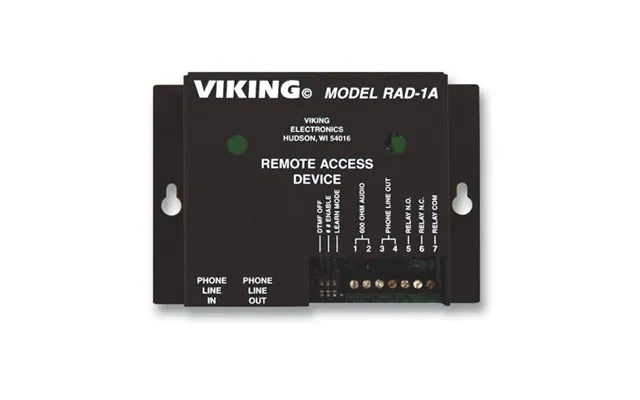
The Viking Rad-1a is a specialized remote access device. According to the supplied description, it allows someone to call from a touch-tone phone and remotely access one- or two-way paging systems, service observers, digital recorders, church programs, and similar connected applications.
Think of it as a bridge between a phone call and a compatible remote system. Instead of needing to be physically present at the connected equipment, a user can call in and interact with the setup remotely. That makes the product especially relevant for applications where telephone access is part of the operating environment.
The listed device connects to a C.O., Centrex, or PABX line. It answers on the first ring and disconnects through CPC, timeout, or by dialing “7,” as stated in the product description. These features are useful for organizations or installations that need a defined way to start and end a remote session.
The device also provides a 600-ohm output and relay contact. Those details may matter when you are checking whether the Rad-1a can fit into an existing telephone or control arrangement. Compatibility should be reviewed carefully before purchase because specialized equipment often depends on the surrounding system.
The Viking Rad-1a is listed with dimensions of 7.5 inches by 7.5 inches by 4.5 inches and a weight of 1.2 pounds. Those measurements can help you estimate whether the unit will fit on a shelf, near a telephone interface, or inside a designated equipment area.
The supplied data identifies the country of origin as the USA and states that the product is provided by the manufacturer, though that information is not verified. It also lists RoHS compliance as yes, Energy Star qualification as no, white box packaging, and a 2-year warranty. Because these details are drawn from the listing, confirm them before relying on them for a purchasing decision.
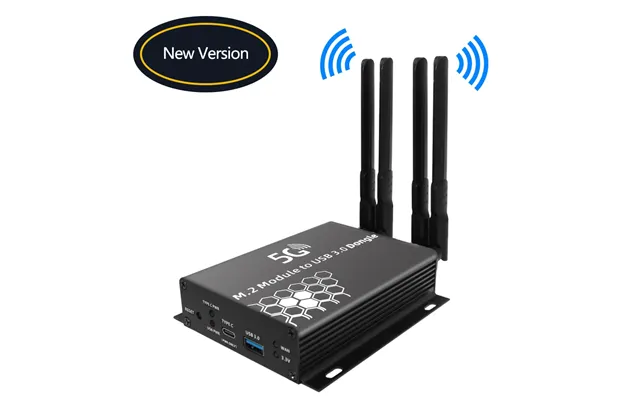
The second offer is a desktop NGFF M.2 Key B to USB 3.0 wireless module adapter card. The description states that it includes two SIM slots and four antenna connections for 5G, 4G LTE, and GSM modem modules.
This is not the same type of product as the Viking Rad-1a. Rather than acting as a telephone remote access controller, the adapter is intended to help connect a compatible wireless module to a desktop computer through USB 3.0. In simple terms, it can serve as a hardware link between a desktop system and a supported wireless modem module.
The product name refers to an NGFF M.2 Key B interface and USB 3.0 connectivity. These terms describe the hardware connection format. If you are considering this adapter, check the interface and module requirements of the wireless component you plan to use.
The adapter is listed with two SIM slots and four antenna connections. Those features may be important for users building a desktop wireless setup, but they do not by themselves confirm compatibility with every SIM card, modem module, carrier, operating system, or antenna. Treat the adapter as one part of a larger setup rather than a complete connectivity solution.
At first glance, both products may appear under the broad networking or modem category. Their purposes, however, are quite different. The Viking Rad-1a focuses on remote access through telephone lines and connected paging or recording systems. The desktop adapter focuses on installing or connecting a wireless module for 5G, 4G LTE, or GSM use.
Which one is better? That depends entirely on your project. If you need telephone-based remote access, the Viking device is the more relevant option. If you need a desktop adapter for a compatible wireless module, the NGFF M.2 to USB adapter is the closer match.
The Viking Rad-1a is the clear fit for a setup involving a C.O., Centrex, or PABX line and remote control through a touch-tone phone. Its listed relay contact, 600-ohm output, and automated answering and disconnect functions point toward structured telephone-access applications.
It may be worth considering for installations involving paging systems, digital recorders, service observers, or church programs, all of which are specifically mentioned in the supplied description. You should still verify the exact equipment connection and operating requirements before ordering.
The desktop adapter is aimed at a different user: someone working with a compatible 5G, 4G LTE, or GSM wireless module and a desktop computer. Its two SIM slots and four antenna connections may be useful when planning a more flexible wireless hardware arrangement.
Because the offer does not list a wireless module, SIM card, antenna, carrier service, or operating system support, the adapter should not be viewed as a ready-to-use modem package. It is an adapter card intended to support a broader configuration.
The Viking Rad-1a is listed at $127.12, while the desktop NGFF M.2 adapter is listed at $35.29. The difference reflects more than price alone: these products have different designs, functions, and intended environments.
A lower price does not automatically mean better value, just as a higher price does not guarantee a better fit. The right question is, “Which product solves my actual connectivity problem?” Buying an inexpensive adapter without a compatible wireless module may leave you with extra hardware but no working setup. Likewise, choosing a specialized telephone-access device for a desktop wireless project would not address the same need.
When comparing these products, consider the complete project cost. For the Viking unit, you may need to review the existing telephone line, connected equipment, and installation requirements. For the desktop adapter, you may need a compatible wireless module, SIM card, antennas, and suitable software or drivers.
The reference data does not provide shipping costs, current availability, additional accessories, or installation fees. Do not assume those details are included. Review the seller listing carefully before placing an order.
Before installing the Viking device, identify the telephone line type and the equipment you want to access remotely. The listing mentions C.O., Centrex, and PABX connections, so confirming your system type is an important starting point.
Next, consider where the unit will sit. Its listed size is 7.5 inches by 7.5 inches by 4.5 inches, with a listed weight of 1.2 pounds. Leave enough room for the necessary line, output, and relay connections. A tidy installation is easier to inspect and troubleshoot later.
Because the device interacts with telephone and control equipment, follow the manufacturer’s instructions and use qualified assistance when appropriate. The product description provides general capabilities, but it does not provide a complete installation guide or wiring diagram.
For the NGFF M.2 adapter, begin by checking the wireless module’s interface. The product name identifies an M.2 Key B connection, so a different M.2 key format may not be suitable. You should also confirm that the desktop computer has an appropriate USB connection and enough internal space for the adapter and connected components.
Review the requirements for the intended 5G, 4G LTE, or GSM module. The adapter listing does not identify a particular module brand, operating system, carrier, or antenna model. Those missing details are important because wireless hardware compatibility is rarely universal.
Handle internal computer components carefully and follow safe installation practices. If you are not comfortable opening a desktop computer or configuring wireless hardware, professional technical help may reduce the risk of damage or setup problems.
Start with the type of connection you need. Are you trying to access a telephone-connected system remotely, or are you trying to connect a desktop computer to a cellular wireless module? This single question can quickly separate the Viking device from the desktop adapter.
Then check the interfaces. The Viking listing refers to telephone-line connections, a 600-ohm output, and relay contact. The adapter refers to an NGFF M.2 Key B interface, USB 3.0, two SIM slots, and four antenna connections. Matching these details to your existing hardware is more important than choosing based on the product title alone.
Finally, consider what is not included in the description. The data does not confirm cellular service, wireless module inclusion, antenna inclusion, software support, or carrier compatibility for the desktop adapter. It also does not provide a complete system compatibility list for the Viking product. When details are unknown, verify them before purchasing.
ZoneOffer brings product offers together so you can compare options in one place. It is a comparison site, not a store, and it does not replace the seller’s product page. Its value comes from helping you see differences in product type, listed price, brand, and described features.
For these two offers, comparison is especially helpful because the products are not direct substitutes. Looking at them side by side makes the distinction clear: the Viking Rad-1a is a remote access device for telephone-connected systems, while the desktop adapter is a hardware interface for a compatible wireless module.
Use the comparison as a starting point. Once you find a promising option, review the current seller information and confirm the technical details that matter to your project.
If your project involves remote access through a touch-tone phone, paging equipment, a digital recorder, or a telephone-based control system, the Viking Rad-1a deserves attention. Its listed features include connections for C.O., Centrex, or PABX lines, first-ring answering, defined disconnect methods, a 600-ohm output, and relay contact.
If your goal is to connect a desktop computer with a compatible 5G, 4G LTE, or GSM wireless module, the NGFF M.2 Key B to USB 3.0 adapter may be the more relevant choice. Its listed two SIM slots and four antenna connections support that kind of hardware planning, but the adapter should be evaluated alongside the rest of your intended setup.
In conclusion, the best modem-related product is not necessarily the most expensive or the least expensive. It is the one that matches your connection type, interfaces, and project requirements. Compare the Viking Rad-1a and desktop wireless adapter based on function first, then review the listed price and seller information before making your decision.