





Cassette Players & Recorders
Loading...
Loading...
There is something wonderfully tactile about cassette tapes. You press a button, hear the gentle movement of the mechanism, and watch your favorite recording come alive. Unlike a purely digital file, a cassette feels like a small piece of personal history. That nostalgic appeal has helped cassette players and recorders remain interesting to collectors, music fans, hobbyists, and anyone who wants to preserve older recordings.
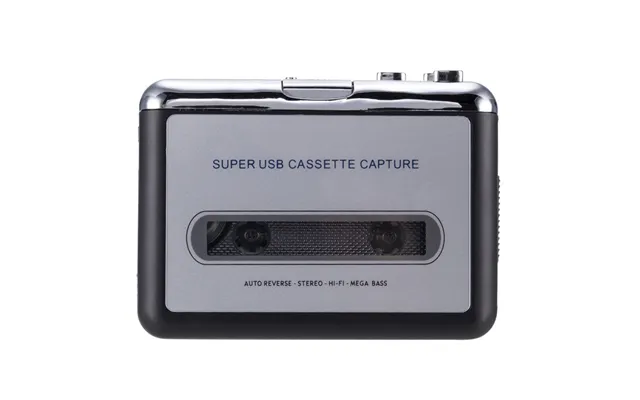
The reference offer for this guide is the Unbeatable Quality Usb Cassette Capture from Voghion, listed at $24.07. ZoneOffer is a comparison site, so it does not sell the product directly. Instead, it helps shoppers review available product information and compare options before deciding what may suit their needs.
Whether you own family recordings, old mixtapes, spoken-word cassettes, or music collections, a USB cassette capture device can make the transition from tape to computer much simpler. But what should you look for? How does cassette capture work? And is a compact device a sensible choice for your listening and archiving plans?
Cassettes may belong to another era, but they continue to offer a listening experience that feels personal. A playlist on a phone is convenient, yet a mixtape has a beginning, an ending, and a story. You can hold it, label it, rewind it, and remember where you were when you recorded it.
For many people, cassette players are also practical tools. Old recordings may exist only on tape, especially home interviews, school performances, family messages, radio recordings, or early music projects. If the original equipment is no longer available, a cassette player or recorder can provide a way to access those sounds again.
The format can be compared to a paper photograph. Digital copies are easy to store and share, but the physical original often carries more emotional weight. A cassette player bridges those two worlds by allowing you to enjoy the tape while exploring modern ways to preserve its contents.
USB cassette capture generally refers to the process of playing audio from a cassette and transferring that sound to a computer through a USB connection. The device acts as a link between the tape and digital audio software. Instead of listening only through the cassette player, you can potentially create a digital recording for later playback or organization.
The basic process is straightforward. You place the cassette inside the player, connect the device to a compatible computer using USB, and use recording software to capture the audio. The final result may be saved as a digital file, depending on the software and settings you choose.
This approach can be useful when your goal is preservation. Tapes can become worn, stretched, dusty, or damaged over time. Creating a digital copy gives you another way to listen without repeatedly using the original cassette. It is similar to making a photocopy of an important document: the original remains valuable, but the copy can be easier to use.
A USB cassette capture device may be useful for more than commercial music tapes. You might want to preserve a homemade mixtape, a recording of a family member, a lecture, a rehearsal, or an old radio program. The value of the recording often has less to do with audio perfection and more to do with its memories and content.
Before beginning, consider the condition of your tapes. A cassette that plays clearly may be easier to capture than one with tangled tape, severe distortion, or mechanical damage. If a recording is especially important, handle it carefully and avoid repeatedly rewinding and replaying it unnecessarily.
The featured offer in the reference data is titled Unbeatable Quality Usb Cassette Capture. It is associated with the Voghion brand and listed through Voghion at $24.07. The available description is brief, identifying the product as a USB cassette capture option.
Because the reference data does not provide a full technical specification list, buyers should avoid assuming details that are not confirmed. For example, the supplied information does not specify supported operating systems, included cables, recording software, cassette playback controls, audio formats, power requirements, or compatibility with particular computers.
That does not make the offer unhelpful. It simply means that careful shoppers should verify the product information shown on the current listing before making a purchase decision. Think of the listed price as the starting point for comparison, not as a substitute for checking the features that matter most to you.
Start by identifying your main purpose. Are you hoping to digitize a box of old tapes, listen casually to a few favorites, or create a long-term archive? Each goal can lead you to different priorities. Someone preserving family recordings may care most about stable playback and a simple computer connection, while a casual listener may focus on convenience.
Next, review the listing for information about the connection method and software process. Look for details about how the device links to your computer and whether recording software is included or needs to be sourced separately. Since those details are not provided in the reference data, they should be confirmed before purchase.
Finally, compare the offer with your own equipment. Do you have a computer with a suitable USB port? Do you have enough storage for your recordings? Are your tapes in playable condition? A capture device is one piece of the process, much like a scanner is only one part of creating a digital document archive.
When comparing cassette players and recorders, it helps to separate essential features from attractive extras. The right choice depends on how you plan to use the equipment, but several categories deserve attention.
USB connectivity is central to a capture-focused device because it provides the pathway from cassette audio to a computer. Check the listing carefully for the type of USB connection and any stated compatibility information. If the connection details are unclear, confirm them before ordering rather than guessing.
Simple controls can make a major difference during long recording sessions. Play, stop, rewind, and fast-forward functions help you navigate a tape. If you plan to digitize selected sections instead of an entire cassette, responsive controls may save time and frustration.
Audio quality depends on more than the capture device alone. The condition of the tape, the original recording, the cassette mechanism, the connection, and the recording software can all affect the result. A worn tape may sound dull or uneven even when the capture process works correctly.
It is wise to set realistic expectations. USB capture can help preserve meaningful audio, but it may not restore damage that already exists on the cassette. In other words, the device can transfer what the tape contains; it cannot magically rebuild missing sound.
Some shoppers want a cassette device for use at a desk, while others prefer something they can move between rooms or take on a trip. The reference data does not state the power source, battery requirements, or portability details for the featured offer, so those points should be checked in the current product information.
The exact steps can vary depending on the device and software, but the overall workflow is easy to understand. First, inspect the cassette. Make sure the tape is not visibly tangled and that the shell appears intact. If the cassette has been stored for years, handle it gently.
Next, place the cassette into the player and connect the USB cable to your computer if the device includes that connection. Open compatible recording software and choose the appropriate input. At this stage, you may want to record a short test section. A brief test can reveal problems before you spend time capturing a full tape.
When the levels and settings appear acceptable, begin playback and recording. Stay nearby during the process, especially if the tape is old. Listening as the transfer happens can help you notice sudden noise, stopping, distortion, or other issues.
After recording, save the file with a clear name. Include useful information such as the tape title, side, approximate date, or original owner. Good file naming may seem boring, but it becomes extremely valuable when your digital collection grows. A file called “Tape 1” is much less helpful than one that explains what the recording contains.
A simple folder system can keep your recordings manageable. You might create separate folders for music, family recordings, spoken audio, and miscellaneous tapes. Within each folder, use consistent names and add notes when the contents are uncertain.
Consider keeping more than one copy of recordings that matter deeply to you. One copy could remain on your main computer, while another could be stored separately. The reference data does not specify storage or backup services, so the method is entirely your choice. The important idea is to avoid relying on a single file in a single location.
Cassette equipment can support several kinds of projects. Music fans may use it to revisit old albums or personal mixtapes. Families may use it to preserve voices and stories that are no longer available anywhere else. Students, performers, and hobbyists may have older practice recordings that they want to review or archive.
Collectors may also enjoy cassette players as part of a physical media setup. The appeal is not only the sound. It is the ritual: selecting the tape, pressing play, and watching the reels turn. That slower pace can feel refreshing in a world where almost every song is instantly available.
For creative users, cassette recording can also be part of an artistic process. Tape has a distinct character, and some musicians or sound designers enjoy working with physical media. However, the featured offer is identified in the reference data as a USB cassette capture product, so buyers should confirm whether its functions match their intended recording workflow.
Clean handling is a good starting point. Keep tapes away from heat, moisture, dust, and strong magnetic sources. Store them in a stable location and avoid leaving them in places where they may warp or collect debris.
Use a test recording before capturing an entire tape. This small step can expose connection problems, unexpected volume levels, or software settings that need adjustment. It is much easier to correct a short test than to repeat a full transfer.
Record each side separately when that makes organization easier. Label the files clearly, and listen to the beginning and end of each recording after saving it. This helps confirm that the transfer includes the material you intended to preserve.
Do not rush the process. A cassette plays in real time, so a long tape will take time to capture. Treat the session like watching a pot slowly come to a boil: patience produces a more dependable result than constant interruption.
A USB cassette capture device may appeal to anyone with recordings that are difficult to access through modern equipment. It can be especially interesting to people who own personal tapes and want to explore digital preservation without building a complicated audio setup.
It may also suit shoppers who enjoy retro electronics but still want a connection to current computers. The USB element creates a practical bridge between an older physical format and a contemporary digital library.
On the other hand, buyers seeking advanced studio recording tools should examine the specifications carefully. The reference data does not describe professional audio features, detailed controls, file formats, or performance measurements for the featured offer. If your project has demanding technical requirements, use the product listing to confirm whether the device is appropriate.
ZoneOffer is a comparison site, not a store. Its role is to help shoppers review product information and make more informed comparisons. For the featured cassette capture offer, the available data identifies the title, the Voghion brand, Voghion as the listed store, and a price of $24.07.
Comparison shopping works best when you begin with a clear checklist. Write down the features you need, the types of tapes you own, and the computer equipment you plan to use. Then compare the information available for each option rather than focusing only on the product title or price.
Prices and listing details can change, so confirm the current information before completing a purchase. The reference data does not provide availability, shipping information, discount details, ratings, or return terms for this offer. Those points should not be assumed and should be checked directly in the current listing if they are important to your decision.
Once you begin exploring your tapes, you may discover more than music. Old labels, handwritten track lists, and recording dates can reveal stories about the people and moments connected to each cassette. Take notes as you work, especially when the contents are unclear.
You can also create a small catalog for your collection. Record the cassette title, its condition, what each side contains, and whether you have created a digital copy. This turns a scattered stack of tapes into an organized personal archive.
Most importantly, enjoy the process. Cassette preservation is not only about converting sound into files. It is about giving overlooked recordings another chance to be heard. With thoughtful handling and realistic expectations, even a simple capture project can become a rewarding trip through your own history.
Cassette players and recorders remain useful because they connect physical memories with modern listening habits. The featured Unbeatable Quality Usb Cassette Capture from Voghion is listed at $24.07 and may interest shoppers who want to explore USB-based cassette capture. Since the supplied product information is limited, review the current listing carefully for compatibility, controls, software, and other technical details. By comparing features thoughtfully and handling your tapes with care, you can preserve meaningful audio while keeping the character of the cassette format alive.