


Cash Registers & POS Terminals price list
Last updated Tuesday, Nov 17, 2026

View 5 Offers

Loading...
Last updated Tuesday, Nov 17, 2026
Choosing the right checkout equipment can shape the rhythm of your entire business. A suitable cash register or POS terminal helps your team process transactions with confidence, keep the counter organized, and create a smoother experience for customers. But with so many formats available, where should you begin?
This guide explores two listed products in the cash registers and POS terminals category: the All-in-one Foldable Cash Register HDD-280F and the Z92 Dual Screen All-in-one Android POS Terminal. Both are presented as equipment for checkout environments, yet they take noticeably different approaches. One emphasizes a foldable register design with an aluminum alloy shell, while the other combines dual screens, Android, NFC, and vending-related payment functions.
ZoneOffer is a comparison site, not a store. The product details and listed prices below are based on the supplied comparison data, so you can use them as a starting point while evaluating which type of checkout setup fits your operation.
A checkout station is more than a place where money changes hands. Think of it as the final chapter of the shopping journey. If the process feels organized, customers can move through it comfortably. If the equipment feels awkward or mismatched to the environment, even a busy store can lose momentum.
Cash registers and POS terminals can support different business needs. A traditional register-style unit may suit a counter where simplicity and a familiar layout matter. A modern POS terminal may be more appealing when you want an Android-based interface, multiple screens, or specialized payment-related functions.
The best choice depends on the way you sell, the space available at the counter, and the functions your staff use most often. A compact environment may call for flexible hardware, while a larger retail setting may prioritize visibility and a clear customer-facing display.
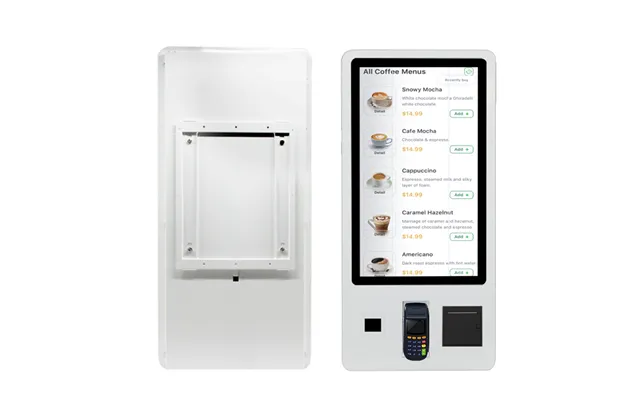
The All-in-one Foldable Cash Register HDD-280F is listed as a checkout counter product for supermarket use. Its title identifies an all-in-one design, a foldable format, and an aluminum alloy shell. The listed screen options are 15 inches or 15.6 inches, giving shoppers a choice between two screen sizes.
The foldable design is the standout feature. Folding hardware can be useful when a business wants to think carefully about counter space and equipment positioning. Like a hinged notebook, a foldable unit may offer a more adaptable physical setup than a fixed-format terminal, although the exact folding mechanism and adjustment range should be confirmed with the seller.
The aluminum alloy shell also gives the product a distinct construction description. The reference data does not specify the full durability rating, weight, ports, operating system, or included accessories, so those details should not be assumed. Instead, shoppers should treat the shell material as one factor to compare alongside dimensions, screen configuration, and compatibility.
This model may be worth comparing if you are evaluating equipment for a supermarket-style checkout counter and prefer an all-in-one form. It may also appeal to businesses that want to investigate a foldable register rather than a conventional fixed terminal.
The listed price for this offer is US$230. The reference data identifies the store as Alibaba and does not provide a regular price. It also mentions exclusive perks of up to US$500 off within the offer description, but shoppers should verify the exact terms, eligibility, and final checkout price before making a decision.
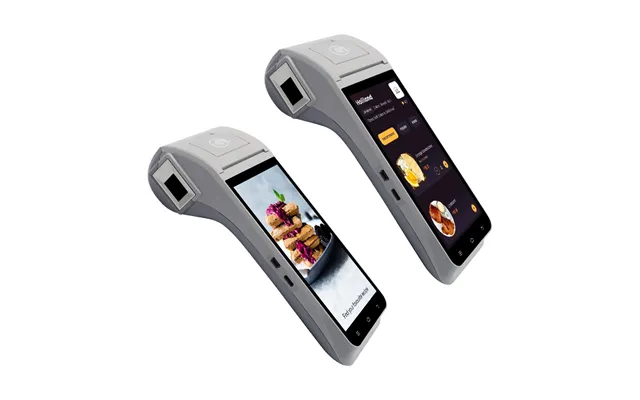
The Z92 is listed as a dual-screen all-in-one Android POS terminal. Its title also identifies an NFC reader, a vending machine bill acceptor, and the ability to function as an Android POS terminal. These features give it a more technology-focused profile than a basic register format.
Dual-screen hardware can support a two-sided checkout experience. One display may be used by the operator while another can face the customer, depending on the specific configuration and software setup. The reference data confirms the dual-screen description, but it does not explain the screen sizes, resolution, mounting angle, or exact roles of each display.
The Android label may be relevant to businesses that prefer a familiar touchscreen-style operating environment. However, the supplied data does not name a version of Android, installed applications, processor, memory, storage, or software compatibility. Those are important questions to ask before purchasing because hardware is only one half of a POS system.
The Z92 title specifically includes an NFC reader and a vending machine bill acceptor. NFC can be associated with short-range contactless interactions, while a bill acceptor is designed to handle paper currency in suitable equipment setups. Still, the reference data does not state which payment methods are supported, which currencies are accepted, or whether additional payment hardware is required.
If these functions matter to your business, ask for a complete specification sheet. You may want to confirm whether the reader supports your preferred payment workflow, whether the bill acceptor is integrated or optional, and whether the terminal is intended for a particular vending configuration.
The listed price for the Z92 offer is US$80, and the reference data identifies Alibaba as the store. No regular price is supplied. The offer description mentions exclusive perks of up to US$500 off, but the actual conditions should be checked carefully because promotional terms can vary.
At a glance, the HDD-280F and Z92 appear to target different checkout priorities. The HDD-280F is described as a foldable cash register with an aluminum alloy shell and 15-inch or 15.6-inch screen options. The Z92 is described as a dual-screen Android POS terminal with NFC and a vending machine bill acceptor.
The HDD-280F may be the more natural product to investigate for a supermarket-style counter where a register format and flexible physical design are important. The Z92 may be more relevant to shoppers exploring Android-based POS equipment, dual-display use, or vending-related functions.
Price is another visible difference in the comparison data. The HDD-280F is listed at US$230, while the Z92 is listed at US$80. Price alone should not decide the purchase, though. A low upfront price can be less attractive if the unit does not match your software, payment, installation, or workflow needs.
The HDD-280F is listed with 15-inch or 15.6-inch screen options, a foldable structure, an aluminum alloy shell, and supermarket checkout positioning. Its listed price is US$230.
The Z92 is listed with a dual-screen design, Android POS functionality, an NFC reader, and a vending machine bill acceptor. Its listed price is US$80.
Both offers are shown through Alibaba in the supplied data. Neither listing includes a regular price, and the reference information does not confirm stock, shipping cost, warranty, software support, or installation services.
Start with your checkout routine rather than the product name. What does a cashier do from the moment a customer arrives to the moment the transaction ends? Write down the steps. Then look for hardware that supports that sequence without adding unnecessary friction.
For example, if your team mainly needs a clear counter-based register, the HDD-280F’s listed format may deserve closer attention. If you are exploring multiple screens or Android-based operation, the Z92 may offer a different direction. Neither product should be considered automatically better; the better match is the one that fits the job.
Measure the available area before choosing equipment. A terminal may look compact in a product title but still require room for cables, payment accessories, receipts, merchandise, and customer interaction. The HDD-280F’s foldable description may be relevant here, but exact dimensions are not included in the reference data.
For the Z92, ask for the complete footprint and screen arrangement. A dual-screen unit may need more deliberate positioning so both the operator and customer can view their respective displays comfortably.
Every new terminal introduces a learning curve. Staff members need to understand how to begin a transaction, correct mistakes, handle payments, and finish the sale. An interface that looks advanced is not necessarily the easiest to use in a busy environment.
Ask whether the seller provides software information, setup guidance, or documentation. The supplied data does not confirm training or support services for either product, so these points need to be verified independently.
Hardware and software must work together like two halves of a pair of scissors. If one half does not fit, the whole tool becomes less useful. Before buying, confirm whether the terminal works with your POS software, accounting process, inventory tools, and payment setup.
The Z92 is identified as an Android POS terminal, but the reference data does not specify its operating system version or compatible applications. The HDD-280F listing also does not provide operating system or software information. Treat compatibility as an open question rather than an assumed feature.
Payment hardware deserves careful attention because checkout equipment is closely tied to how customers pay. The Z92 listing mentions NFC and a vending machine bill acceptor, but it does not outline the complete payment ecosystem. You should confirm whether the terminal can support the payment methods used by your customers and whether separate devices are needed.
For the HDD-280F, the reference data does not identify payment readers, bill acceptors, or other payment accessories. That does not prove they are absent; it simply means the supplied information does not confirm them. Ask the seller for a detailed list of included and optional components.
Also consider how your business handles payment errors, canceled transactions, and end-of-day reconciliation. A terminal can look impressive on the counter, but dependable workflows matter more than appearance. Clear documentation may save your staff a great deal of confusion later.
The HDD-280F is specifically described with an aluminum alloy shell. Shoppers may want to compare that construction with the materials used in other terminals, especially when the unit will sit in a busy retail environment. The reference data does not provide a durability certification or an impact rating, so avoid treating the shell material as a guarantee of long-term performance.
The foldable format is another design point to investigate. Ask how the unit folds, whether the screen angle can be adjusted, and how cables behave when the device is repositioned. A flexible design can be helpful, but only if it remains practical during everyday use.
The Z92’s dual-screen layout may support a more visible interaction between operator and customer. Still, the exact arrangement, screen size, viewing angle, and mounting details are not included. Request images, measurements, and a complete technical description before deciding whether it suits your counter.
The displayed price is an important starting point, but it may not represent the entire cost of setting up a checkout station. Depending on your business, you may also need software, payment accessories, receipt equipment, cables, networking equipment, or installation assistance. The supplied data does not confirm which accessories are included with either listing.
The HDD-280F is listed at US$230, and the Z92 is listed at US$80. The offer descriptions mention exclusive perks of up to US$500 off, but the data does not explain how those perks apply. Always verify the final price, any minimum quantities, and the exact promotion terms before ordering.
It is also wise to compare value over time. A terminal that fits your workflow may reduce staff frustration and avoid the need for an early replacement. On the other hand, paying for features your business never uses may not be sensible. The smartest budget is usually the one connected to real daily needs.
Good questions turn a product listing into a useful buying decision. Ask for the full technical specification, including dimensions, screen details, ports, operating system, storage, and included accessories. These details are not supplied for the featured products, so they should be confirmed directly.
For the HDD-280F, ask how the foldable structure operates and which screen size is available for the quoted offer. For the Z92, ask how the two screens are configured and how the NFC reader and bill acceptor function within the intended setup.
You should also confirm whether the equipment is compatible with your existing POS software and payment process. If you plan to use the product in a supermarket, vending environment, or another specialized setting, explain that use case clearly before purchasing.
Comparison shopping can save time because it places key offer details in one view. On ZoneOffer, you can use the available product information to identify differences in design, functions, and listed prices. The site helps you compare; it does not act as the seller or guarantee the terms of an individual offer.
When reviewing these two listings, begin with the facts that are clearly stated. The HDD-280F offers a foldable all-in-one cash register format, 15-inch or 15.6-inch screen options, and an aluminum alloy shell. The Z92 offers a dual-screen Android POS terminal description with NFC and a vending machine bill acceptor.
Then separate confirmed details from questions that still need answers. This simple habit prevents assumptions from sneaking into your decision. A comparison page is the map, but you still need to check the road conditions before starting the journey.
The All-in-one Foldable Cash Register HDD-280F and the Z92 Dual Screen Android POS Terminal represent two different approaches to checkout equipment. The HDD-280F may interest businesses comparing foldable register designs for supermarket-style counters, while the Z92 may appeal to those exploring dual screens, Android POS functionality, NFC, and vending-related bill acceptance. With listed prices of US$230 and US$80 respectively, both deserve careful comparison beyond cost alone. Review compatibility, dimensions, included components, and payment requirements before making your final choice, and use ZoneOffer as a comparison resource rather than a store.