

Scanners price list
Last updated Wednesday, Oct 14, 2026
| Scanners | Price |
|---|---|
| 3dmakerpro Toucan 3d Scanner Standard | $1,284.00 |
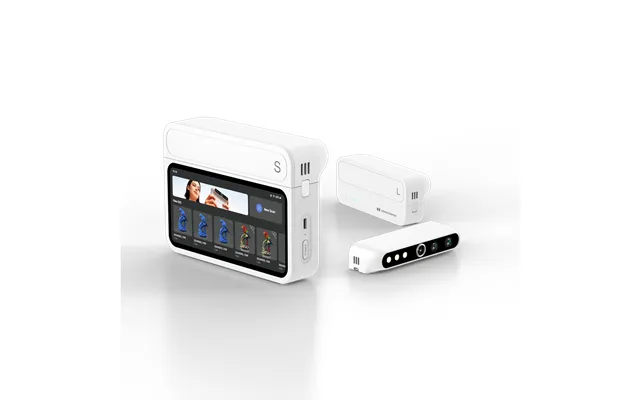
| 3dmakerpro Turtle 3d Scanner Control Pad S L | $1,629.00 |




Loading...
Last updated Wednesday, Oct 14, 2026
| Scanners | Price |
|---|---|
| 3dmakerpro Toucan 3d Scanner Standard | $1,284.00 |
| 3dmakerpro Turtle 3d Scanner Control Pad S L | $1,629.00 |
Choosing a 3D scanner can feel like picking the right lens for a camera: the best option depends on what you want to capture, how much detail you need, and how you plan to work. The current comparison includes two 3DMakerpro models with different approaches. One focuses on flexible scanning through swappable modules and a built-in touchscreen, while the other offers an all-in-one workflow with high stated accuracy and a wide field of view.
In this guide, we’ll compare the 3dmakerpro Turtle 3D Scanner Control Pad S L and the 3dmakerpro Toucan 3D Scanner Standard. You’ll see how their listed features differ, which type of user each model may suit, and what to consider before making a decision. ZoneOffer is a comparison site, so the listed offer information is provided to help you compare options rather than to suggest that ZoneOffer sells either scanner.
The two listed scanners share the 3dmakerpro name, but they are designed around different priorities. The Turtle 3D Scanner Control Pad S L emphasizes flexibility, object-size range, and independent control through a 2K touchscreen. The Toucan 3D Scanner Standard focuses on an all-in-one scanning process, high-power MEMS optics, and a stated accuracy of 0.03 millimeters.
The listed offer for the Turtle is $1,629, compared with a regular price of $2,599. The Toucan is listed at $1,384, compared with a regular price of $1,999. These prices come from the supplied comparison data and may help shoppers see the difference between the two options at a glance. Always review the current listing before making a purchase decision.
The Turtle may attract users who want one scanner setup that can adapt to different object sizes. Its swappable small, medium, and large scanning modules are the centerpiece of its design. The Toucan may appeal more to someone who prefers an integrated workflow and wants a scanner built around its optical system and broad stated field of view.
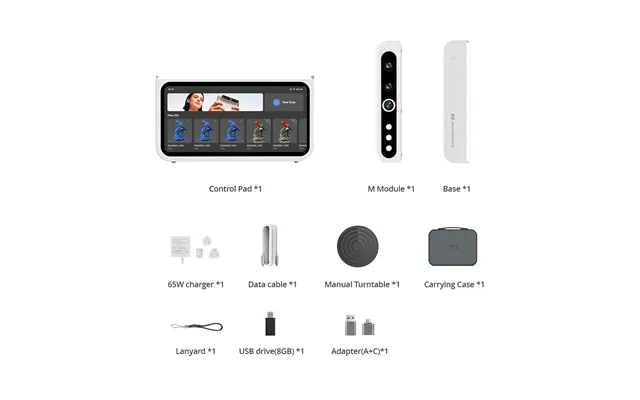
The 3dmakerpro Turtle 3D Scanner Control Pad S L is presented as a new launch with a modular approach. Instead of relying on one fixed scanning module, it includes swappable small, medium, and large modules for different object sizes. Think of it like changing tools in a toolbox: you can select the module that best matches the object in front of you.
This approach is useful for shoppers who may scan a variety of subjects rather than repeating the same type of project. Small objects, medium-sized items, and larger subjects can call for different scanning perspectives. The Turtle’s listed design aims to cover that range without requiring a completely different scanner for every project.
The modular design is one of the clearest differences between the Turtle and the Toucan in the supplied data. The Turtle includes small, medium, and large scanning modules, allowing users to adjust the setup according to the object’s size. That flexibility may be especially appealing for creators, designers, makers, or technical users who work with varied physical subjects.
Before choosing a scanner, ask yourself a simple question: will you scan one consistent type of object, or will your projects change over time? If variety matters, a modular system can make the purchase feel more adaptable. If your work is more specialized, a single all-in-one design may be enough.
The Turtle is listed with a 2.3-megapixel sensor and 76% more pixels for enhanced detail capture. It also supports scanning at up to 30 frames per second when connected to a computer. These specifications point toward a system designed to capture detailed information while maintaining a smooth scanning process.
Frame rate can matter when you move around an object or when the object’s position changes during a scan. The listed maximum of 30 frames per second suggests that the Turtle is built to support active scanning rather than a purely still, stop-and-capture routine. Actual results will depend on the project, setup, lighting, and workflow used.
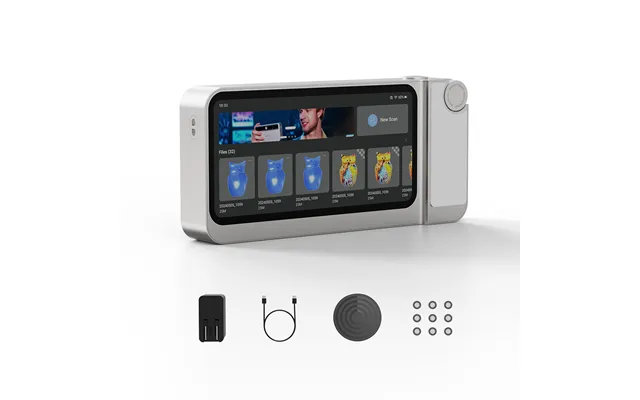
Another notable Turtle feature is its standalone 6.4-inch 2K touchscreen control pad. This gives the model a more self-contained feel and may make it easier to manage scanning without relying entirely on a computer screen. The supplied information specifically identifies the control pad as standalone, making it a key part of the scanner’s overall design.
A dedicated screen can be compared to a dashboard in a car. It puts important controls and visual information in one place while you work. For users who value a direct, hands-on scanning experience, the Turtle’s control pad may be one of its most appealing features.
The 3dmakerpro Toucan 3D Scanner Standard is described as an all-in-one 3D scanner with an all-in-one workflow. Rather than highlighting interchangeable modules, its listed features focus on integrated operation, high stated accuracy, a broad field of view, and high-power MEMS optics.
This type of design may suit users who want a more straightforward scanning solution. When a scanner combines its main capabilities into one system, the experience can feel more direct: connect the scanner, set up the object, and move through the workflow without selecting between multiple modules.
The Toucan’s all-in-one workflow is central to its product description. For shoppers who prefer simplicity, this could be an important advantage. You do not have to start by deciding which scanning module matches the object because the product is presented as a unified scanner system.
That does not mean an all-in-one model is automatically better for every project. It simply reflects a different priority. The Toucan appears suited to users who want integrated functionality, while the Turtle gives more attention to adapting the scanner to different object sizes.
The Toucan is listed with a stated accuracy of 0.03 millimeters and a field of view reaching up to 1000 by 750 millimeters. These details suggest that the model is designed to balance precise capture with the ability to view a broad scanning area. The listed figures should be considered product specifications rather than a guarantee of results in every environment.
A wide field of view can be useful when you want to capture more of an object at once. It is similar to choosing a wide camera lens for a larger scene. Meanwhile, accuracy matters when the captured model needs to preserve fine shape information. The right balance depends on whether your priority is coverage, detail, or both.
The Toucan also features high-power MEMS optics. This optical system is one of the specific technologies identified in the supplied product description. For shoppers comparing technical designs, it provides another point of distinction from the Turtle’s focus on its sensor, modules, and control pad.
When reading scanner specifications, it helps to look at the complete picture instead of focusing on one impressive phrase. Consider how the optical system, scanning area, stated accuracy, and workflow fit together. A specification matters most when it supports the type of work you actually plan to do.
The simplest way to compare these scanners is to look at how each one approaches flexibility. The Turtle is modular, with small, medium, and large scanning modules. It also includes a 2.3-megapixel sensor, up to 30 frames per second scanning with a computer connection, and a standalone 6.4-inch 2K touchscreen control pad.
The Toucan takes an integrated route. It is described as an all-in-one scanner with an all-in-one workflow, high-power MEMS optics, a stated accuracy of 0.03 millimeters, and a field of view of up to 1000 by 750 millimeters. These differences make the choice less about finding one universal winner and more about matching the scanner to your working style.
The Turtle may be the more natural fit if your projects vary in size. Its interchangeable modules give you a way to change the scanning setup as your needs change. The control pad may also appeal to users who want a standalone interface rather than depending entirely on a connected computer display.
Its listed price is $1,629, with a regular price of $2,599 in the supplied data. If you are comparing the two current offers, the Turtle costs more than the Toucan while offering a modular design and standalone control pad. The higher listed price may be worth considering if those features are important to your work.
The Toucan may be a better match if you prefer an all-in-one workflow and want to focus on its stated accuracy, field of view, and MEMS optics. It is listed at $1,384, compared with a regular price of $1,999. That makes it the lower-priced option of the two offers shown in the reference data.
Price should not be the only deciding factor, though. A lower listed price is useful when the features still match your goals. If you need interchangeable modules or a standalone touchscreen, the Toucan’s integrated approach may not provide the same type of flexibility described for the Turtle.
Shopping for a 3D scanner becomes easier when you turn technical specifications into practical questions. What objects will you scan? How much variation will there be in their size? Do you want to work with a computer connection, a built-in control screen, or an integrated workflow? These questions help you translate product language into real-world priorities.
It is also wise to separate essential features from nice-to-have features. For example, a modular system may be essential if your projects cover a wide range of objects. A standalone touchscreen may be valuable if you want direct control. On the other hand, an all-in-one workflow may be your top priority if simplicity matters most.
Object size is one of the most important comparison points in this selection. The Turtle is specifically described as supporting objects across a wide size range through its small, medium, and large modules. The Toucan’s listed field of view reaches up to 1000 by 750 millimeters, which may appeal to users who want a broad scanning area.
Try to picture your typical project before choosing. Will you scan small details, larger objects, or a mixture of both? Your answer can quickly show whether modular flexibility or a broad integrated field of view deserves more attention.
The Turtle is listed with scanning at up to 30 frames per second with a computer connection, while also including a standalone 6.4-inch 2K touchscreen control pad. This combination gives shoppers two important points to consider: how they plan to connect the scanner and how they want to control the process.
If you enjoy working from a computer, the listed connection capability may fit your routine. If you prefer a more direct interface, the standalone control pad may be more appealing. The best choice often feels less like chasing the biggest specification and more like selecting the workflow you will actually enjoy using.
The Turtle and Toucan may both suit users who want to create digital versions of physical objects, but the supplied data presents them in different ways. The Turtle’s flexible modules may support varied scanning projects, while the Toucan’s integrated system may work well for shoppers who prefer a unified setup.
Potential users could include makers, designers, educators, studios, and technical hobbyists. However, the reference data does not provide specific use-case results, software compatibility details, or performance testing. Treat these categories as general examples of who may be interested in this type of equipment, not as guarantees about a particular workflow.
If your projects change frequently, the Turtle’s modular format may offer a useful advantage. You can think of the three module sizes as different brushes in an artist’s kit. Each one is intended for a different scale, giving you more ways to approach the object in front of you.
If you want a unified process, the Toucan’s all-in-one description may be more attractive. Its stated accuracy, broad field of view, and high-power MEMS optics create a clear technical profile. The question is whether that profile matches the kind of objects and scanning routine you have in mind.
According to the supplied data, the Turtle is listed at $1,629, while the Toucan is listed at $1,384. The Turtle’s regular price is shown as $2,599, and the Toucan’s regular price is shown as $1,999. These figures provide a direct comparison of the offers currently included in the reference information.
The Turtle has the higher listed offer price, but it also includes features not described for the Toucan, including swappable modules and a standalone touchscreen control pad. The Toucan has the lower listed offer price and emphasizes its all-in-one workflow, stated accuracy, field of view, and MEMS optics.
A scanner is a long-term equipment decision, so consider value rather than price alone. If modularity will help you handle many object sizes, the Turtle’s added flexibility may matter more than the price difference. If your priority is an integrated scanner with the listed optical and accuracy specifications, the Toucan may offer the more suitable balance.
Because prices and listings can change, use the comparison information as a starting point. Check the current offer details before completing a purchase, and make sure the selected model fits your intended objects, working environment, and preferred control method.
The 3dmakerpro Turtle 3D Scanner Control Pad S L and 3dmakerpro Toucan 3D Scanner Standard take different paths to 3D scanning. The Turtle stands out for its swappable modules, 2.3-megapixel sensor, up to 30 frames per second computer-connected scanning, and standalone 6.4-inch 2K touchscreen control pad. The Toucan focuses on an all-in-one workflow, high-power MEMS optics, a stated accuracy of 0.03 millimeters, and a field of view of up to 1000 by 750 millimeters.
In short, choose the Turtle if adaptable scanning and direct touchscreen control are high on your list. Consider the Toucan if you prefer an integrated setup and want to compare its stated optical and scanning specifications at a lower listed offer price. Whichever direction you take, let your projects lead the decision. The right scanner is the one that fits your work like a well-sized glove.