





Computer Power Supplies
Loading...
Loading...
Choosing a computer power supply can feel like matching the right engine to a machine. The unit needs to deliver enough power, respond accurately, and include sensible protection without making your project unnecessarily complicated. For builders working with adjustable DC systems, solar charging, or custom electronics, the Sinilink XY12522 DC Buck Power Supply offers a feature-rich option to examine.
Listed on ZoneOffer, a comparison site, the Sinilink XY12522 is shown at $31.00 from Banggood.Com. It is designed as a DC buck power supply rather than a conventional desktop ATX power supply. That distinction matters. Instead of plugging directly into household AC mains, this device works with a DC input and lets you adjust the output within its specified range.
In this guide, we will look at the unit’s main specifications, control features, safety settings, MPPT solar charging support, and practical points to consider before choosing it. Think of this as a map: it will not build your system for you, but it can help you understand whether the product fits your intended use.
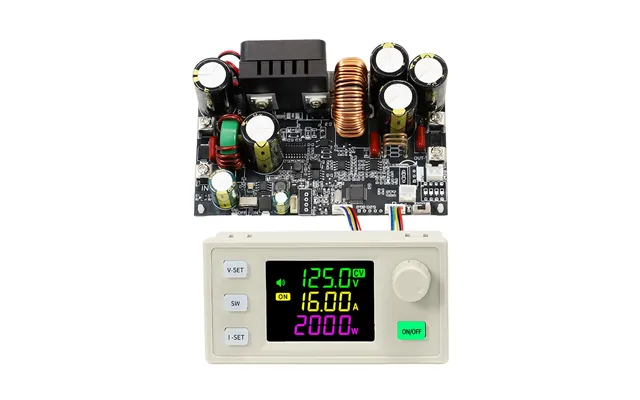
The Sinilink XY12522 is a DC buck power supply with an input range of 12.00 to 140.0 volts and an adjustable output range of 0 to 125.0 volts. Its listed output current range reaches 0 to 22.00 amps, while its stated maximum power output is 2,000 watts.
A buck power supply reduces a higher DC voltage to a lower adjustable DC voltage. You can think of it as a controlled valve: the input provides the available energy, while the unit regulates how much voltage and current appear at the output. Because the output is adjustable, the product may be useful for a variety of electronics and power-control projects that fall within its specified limits.
The listing identifies the product as the XY12522 model and the brand as Sinilink. It also describes an LCD screen, five buttons, stored data groups, soft-start functionality, and several adjustable protection mechanisms.
The listed input range begins at 12.00 volts and extends to 140.0 volts. The product information also states that the maximum input voltage must not exceed 145 volts and recommends use within 140 volts. This makes careful input measurement essential before powering the unit.
The input is for DC power only. The product description specifically warns that the input cannot be connected to AC power or to 220-volt mains power. This is one of the most important details in the entire listing. Treat the input like a one-way road: connect the correct type of power, verify polarity, and stay within the stated voltage limit.
The output voltage can be adjusted from 0 to 125.0 volts, according to the supplied specifications. The output current range is listed as 0 to 22.00 amps, and the output power limit is listed as 2,000 watts.
Those figures describe the product’s stated operating boundaries, not a promise that every combination of voltage and current can be used simultaneously in every setup. Your source, wiring, cooling arrangement, load, and selected protection settings all matter. Before connecting equipment, calculate the expected power requirement and confirm that the system remains within the manufacturer-provided ranges.
The listing gives voltage accuracy as 0.5 percent and current accuracy as 0.5 percent. It also lists voltage resolution of 0.01 volts and current resolution of 0.01 amps. In practical terms, the controls and display are intended to provide fine adjustment rather than broad, imprecise steps.
The Sinilink XY12522 has a listed power output of 2,000 watts and an approximate conversion efficiency of 95 percent. Efficiency describes how much of the input power is converted into useful output power, with the remainder typically becoming heat or being lost through the conversion process.
A stated efficiency of about 95 percent can be appealing for projects where energy use matters. However, efficiency is not the same as a guarantee of identical performance in every situation. Actual results can depend on input voltage, output settings, load size, temperature, and installation conditions.
The listing gives a typical output ripple of 200 millivolts peak-to-peak. Ripple is the small variation that can appear on an otherwise steady DC output. For a project that powers sensitive electronics, you should consider whether that listed ripple level suits the equipment you plan to connect.
One of the more distinctive features in the listing is MPPT support for solar charging. MPPT stands for maximum power point tracking. In simple terms, this function is designed to help a solar-powered system operate closer to the point where the available panel power can be used effectively.
The product’s description identifies MPPT solar charging as a supported function. That may make the unit worth considering for custom solar and DC power projects, especially when adjustable voltage and current control are useful.
Still, solar installations require careful planning. The panel arrangement, battery or load requirements, input voltage, output settings, wiring, and protection limits should all be checked before use. The listing confirms MPPT support, but it does not provide a complete solar system design or specify every compatible panel and battery configuration.
Protection settings act like guardrails around an electrical system. They do not replace correct wiring or careful setup, but they can help reduce the risk of operating outside selected limits. The Sinilink XY12522 listing includes several adjustable protection functions.
Under-voltage protection, or LVP, is listed as adjustable from 10 to 145 volts, with a default of 10 volts. Over-voltage protection, or OVP, is listed as adjustable from 0 to 130 volts, with a default of 130 volts.
These settings can help users define the voltage boundaries for their project. Before switching the system on, review the input and output values carefully. A protection threshold is only useful when it is configured appropriately for the equipment connected to the supply.
Over-current protection, identified as OCP, is listed as adjustable from 0 to 23 amps, with a default of 23 amps. Over-power protection, or OPP, is listed with a range of 0 to 2,000 watts and a default setting.
These features are especially relevant when a load may draw more current than expected. Setting a suitable limit can provide an additional layer of control. However, you should still use wiring, connectors, and loads that are appropriate for the intended current and power levels.
The product also lists over-temperature protection, or OTP, adjustable from 0 to 110, with a default of 95. The listing does not specify the temperature unit, so it is best to follow the product manual for interpretation and setup.
Over-time protection is listed from 1 minute to 99 hours and 59 minutes, with the feature turned off by default. Over-capacity protection is adjustable from 0 to 9,999 amp-hours and is disabled by default. Over-energy protection is adjustable from 0 to 4,200 kilowatt-hours and is off by default.
These controls may be useful for projects that need a time limit or a cumulative capacity or energy boundary. Since several functions are disabled by default, users should not assume that every protection feature is active immediately. Check the settings before connecting a valuable load.
The Sinilink XY12522 includes an LCD screen with a viewable area listed as 38 by 29 millimeters. It also has five buttons for adjusting and managing the unit. A screen can make setup easier because you can review voltage, current, and related operating information directly rather than relying entirely on external meters.
The product description lists storage for 10 data groups. That feature may help users save commonly used settings for repeat projects. Instead of recreating the same configuration each time, you may be able to keep multiple setups available through the device’s controls.
The listing also mentions a buzzer and soft-start functionality. A buzzer can provide an audible indication during operation or alerts, while soft-start is intended to make power application more gradual. The exact behavior of these functions should be confirmed in the included manual or product documentation.
The reference data mentions PC software and a Chinese-version manual. This information is important for anyone who expects computer-based configuration or prefers documentation in a specific language.
If you plan to use the software, check that your computer and project setup are suitable before purchasing. The listing confirms that PC software is referenced, but it does not provide operating-system compatibility details. Likewise, it identifies the manual as a Chinese version rather than confirming the availability of an English manual.
For technical equipment with adjustable limits, documentation is more than a formality. It is the instruction chart that helps you interpret the screen, configure the protections, and connect the input and output correctly.
The listing provides separate measurements for the bare board and the instrument, as well as packaged measurements. It also lists a bare board weight of 242 grams and 270 grams with packaging, plus a product weight of 295 grams and 350 grams with packaging.
Because the supplied measurements are presented in millimeters and grams, users who work with imperial planning should convert them before designing a mounting location or estimating shipping weight. The reference data does not provide imperial conversions, so confirm the final dimensions and weight from the seller’s listing before building a tight enclosure or support bracket.
Electrical power at the listed levels deserves respect. The first safety point is simple: do not connect the input to AC power or 220-volt mains power. The product is specified for DC input, and the listing warns against exceeding 145 volts, with use recommended within 140 volts.
The second point is polarity. The product description states that the positive and negative terminals must not be connected incorrectly. Verify the polarity of the source and the supply before energizing the circuit. A quick check with a suitable meter can be far less costly than replacing damaged equipment.
The third point is planning. Select protection limits before operation, use suitable wiring, avoid exposed conductive connections, and provide an installation environment appropriate for the expected load. If you are not comfortable working with high-power DC systems, seek help from a qualified professional.
The Sinilink XY12522 may appeal to users building adjustable DC power projects, solar charging systems, or custom electronics setups that fit within the listed input, output, current, and power ranges. Its adjustable controls and MPPT support give it a broader role than a fixed-output module.
It may also suit makers who value stored settings, an LCD interface, and configurable protection functions. The 10 data groups could be useful when a project involves multiple recurring configurations.
On the other hand, this is not presented as a conventional desktop computer PSU. If you need a standard internal computer power supply with familiar motherboard connectors, this DC buck module is a different category of product. Matching the supply type to the project is the first decision; specifications come second.
ZoneOffer is a comparison site, not a store. The supplied offer identifies Banggood.Com as the store, lists Sinilink as the brand, and shows a price of $31.00. No regular price, discount amount, rating, or availability information is provided in the reference data, so those details should not be assumed.
When comparing this offer with other computer power supplies or DC converters, look beyond the headline price. Compare input type, output range, maximum current, maximum power, efficiency, ripple, protection settings, control method, documentation, and intended application. A low-cost unit can be a good fit when its specifications match the project, but a mismatch can create extra costs and safety concerns.
The Sinilink XY12522 DC Buck Power Supply stands out for its adjustable 12.00-to-140.0-volt DC input range, 0-to-125.0-volt output range, listed 2,000-watt power capacity, MPPT solar charging support, LCD controls, stored data groups, and configurable protection functions. At the listed $31.00 offer from Banggood.Com, it may be worth comparing for suitable custom DC and solar projects. Before choosing it, confirm that your application uses DC input, stays within the stated limits, matches the available documentation, and includes safe wiring and protection practices.