





Cable Trays
Loading...
Loading...
Messy cables can make a tidy room feel unfinished in seconds. A charger slips behind the desk, a computer cord drags across the floor, and suddenly your workspace looks more like a tangled fishing net than an organized office. The right cable management solution helps you take back control without turning installation into a major project.
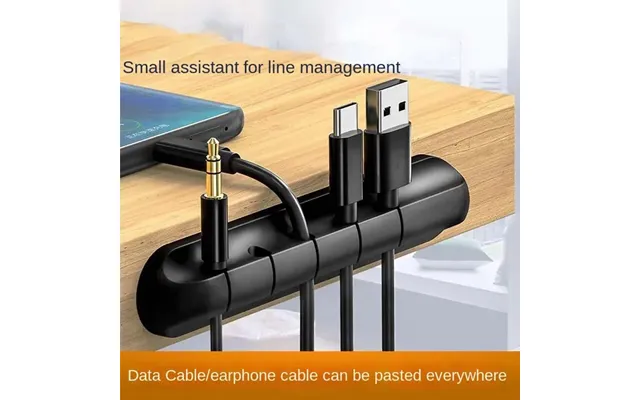
In the cable tray category, shoppers can compare products designed to guide, hold, and organize cables. The reference offer focuses on a simple option: the Self-adhesive Cord Manager, a silicone cable organizer made for no-drill installation and home office use. Listed at $9.04 through Voghion, it may appeal to anyone who wants a quick way to keep cords in place.
This guide explains how cable organization products work, where a self-adhesive cord manager fits into your setup, and what to consider before choosing one. ZoneOffer is a comparison site, so you can use the available listing as a starting point while reviewing your needs and comparing options.
Cables are useful, but loose cords rarely stay where you put them. They slide off desks, twist around one another, and collect dust in corners. A cable management solution acts like a set of traffic lanes, giving each cord a more predictable path.
Better organization can also make a room feel calmer. When charging cables, computer wires, and other cords are kept together, your desk has fewer visual distractions. You can see what you need more quickly instead of sorting through a knot every time you want to connect a device.
There is a practical side, too. Cords left across a walking area can become a tripping concern, while cables pulled sharply around desk edges may become difficult to use. Keeping wires routed neatly can help create a cleaner and more manageable workspace.
Home offices often combine a computer, monitor, keyboard, phone, speakers, and charging accessories in one compact area. That concentration of equipment creates plenty of cable clutter. A cord organizer can help guide individual wires along a desk or nearby surface, making the setup easier to maintain.
You do not always need a large under-desk tray for a small workspace. If your main problem is that cords keep falling behind the desk, a compact organizer may address the issue directly. Think of it as a small anchor point for your cables rather than a large storage system.
A self-adhesive cord manager is a cable organization accessory designed to attach to a surface without drilling. The listed product is described as a silicone cable organizer with no-drill installation and home office use. Its adhesive design is intended to make placement simpler than installing a product that requires screws or tools.
The silicone construction is another notable part of the product description. Silicone organizers are commonly shaped to hold or guide cords while remaining flexible. That makes this type of accessory suitable for everyday cable routing where you want a soft, compact holder rather than a rigid enclosure.
Because the reference data does not specify the number of cable slots, dimensions, adhesive type, supported surfaces, or maximum cable size, shoppers should review the product listing for those details before making a purchase decision. These specifications can determine whether the organizer suits your desk, wall, nightstand, or other surface.
No-drill installation can be useful when you want to avoid making holes in furniture or walls. It may also suit renters, temporary workspaces, and people who frequently rearrange their desks. Instead of treating cable management like a construction project, you can approach it as a small organizational adjustment.
Even with adhesive products, placement matters. A flat, clean surface is generally a sensible starting point, but the specific preparation and application instructions should come from the product listing or packaging. Avoid assuming that every adhesive organizer works equally well on every material.
The reference data lists one product: the Self-adhesive Cord Manager - Silicone Cable Organizer No-drill Installation Home Office Use Eu. It is listed under the Voghion store and carries the Voghion brand. The listed price is $9.04.
This product may be worth considering if your goal is straightforward cord control rather than a large cable storage system. Its description highlights three central features: self-adhesive attachment, silicone construction, and no-drill installation for home office use.
Since the reference data provides no regular price, discount amount, customer rating, stock statement, shipping information, or detailed measurements, those points should not be assumed. Use the available listing as a comparison reference and verify current information before purchasing.
The organizer could be relevant to people who want to keep frequently used cords from slipping away. For example, you may want a charging cable to remain beside your laptop, phone, or bedside table instead of dropping behind the furniture.
It may also suit a compact desk where a full-size tray would take up unnecessary room. Small accessories can sometimes make the biggest difference in tight spaces because they solve one specific problem without adding another bulky item.
The terms cable tray and cord organizer can describe different levels of cable management. A cable tray usually suggests a support system that holds or routes multiple cables, often beneath a desk or along a larger installation. A cord organizer is often smaller and more focused on guiding individual cords.
Which one should you choose? Start with the size of the problem. If several cables hang beneath your desk and create a broad tangle, a tray-style solution may be more appropriate. If one or two cords keep sliding away, a compact adhesive organizer may be enough.
Consider access as well. A large cable tray can gather several wires out of sight, while a cord manager keeps a cable easy to reach. For chargers and frequently connected devices, accessibility may matter just as much as concealment.
For a home office, you might divide your setup into zones. Place computer-related cables together, keep charging cords near the devices that use them, and route power cables away from areas where your feet move. A small organizer can support this approach by keeping individual cords close to their intended location.
For entertainment areas, cable routing may require a different approach because multiple devices often share one space. A larger management solution may be useful when many cables must travel in the same direction. The important point is to avoid buying more product than your setup actually needs.
Product descriptions can sound similar, but small differences may affect everyday use. Before choosing a cable management accessory, review the features that influence installation, capacity, placement, and access.
For a self-adhesive product, check which surfaces are suitable and whether the listing provides application instructions. A product designed for smooth furniture may not perform the same way on textured, dusty, damp, or uneven surfaces. Surface compatibility is a practical detail, not a minor footnote.
The featured organizer is described as silicone. You may want to consider whether the material feels appropriate for your intended location and cable type. A flexible organizer can be convenient for routing cords, but the product’s exact level of flexibility and cable capacity should be confirmed from the listing.
How many cords do you need to manage? If the answer is one or two, a compact holder may be suitable. If you have a larger bundle, check the product’s stated capacity before ordering. The reference data does not provide a capacity or dimension, so those details remain important items to verify.
Some shoppers want cables completely hidden, while others prefer easy access. A desk-mounted organizer may leave the cable visible but stop it from falling. That trade-off can be worthwhile when convenience matters more than a totally concealed setup.
Start by identifying every cable in the area. Unplugging and separating them can reveal which cords are essential, which are rarely used, and which may no longer serve a purpose. Do you really need every cable on the desk at the same time?
Next, decide where each device should sit. Cable management works best when the route is planned before the accessory is installed. Place your laptop, monitor, charger, or other equipment where you want it, then consider the shortest practical path for each cord.
Keep frequently used cables within easy reach. A charging cord that is perfectly hidden but difficult to grab may become frustrating. Good organization is not just about appearance; it should make your routine smoother.
Grouping can make a complicated setup easier to understand. You might separate cables by device, purpose, or direction. For example, computer accessories could follow one route while charging cables remain closer to the front edge of the desk.
Avoid forcing every cord into one tight bundle. Different cables may need different amounts of movement, and an overly compressed group can be harder to adjust later. Leave enough room for normal use while keeping the route tidy.
The appeal of a no-drill organizer is its simplicity, but careful placement can still improve the result. Before attaching the product, consider whether the chosen location gives the cable a natural route. If the cord must bend sharply to reach the organizer, another position may work better.
Think about how often the surface is touched or cleaned. An organizer placed where your hand constantly brushes against it may be more likely to get disturbed. A location beside the device or along the rear edge of a desk may provide a better balance between access and stability.
Follow the product-specific instructions for preparing the surface and applying the organizer. The reference data confirms the no-drill design but does not state the recommended curing time, surface restrictions, or adhesive strength. Those details should be checked in the current product information.
Your workspace may change when you add a monitor, move a desk, or replace a device. Before fixing an organizer in place, ask whether the location will still make sense after a small rearrangement. A little planning now can save you from having to reorganize the entire cable path later.
A tidy cable setup can make daily tasks feel less interrupted. You spend less time reaching behind furniture, searching for a charger, or untangling wires before starting work. The improvement may be small, but repeated small frustrations add up.
Organization can also improve the appearance of a room. A clean desk creates a more intentional visual impression, whether you are working, studying, gaming, or handling everyday tasks. Like straightening a picture frame, routing a loose cable can make the whole area feel more finished.
There is also a maintenance advantage. When cables follow clear routes, it is easier to identify a problem, disconnect a device, or replace one cord without disturbing the entire setup. Simple visibility can be valuable when several devices share one workspace.
When comparing products, look beyond the product title. Review the material, attachment method, intended use, size, capacity, and installation requirements. A product that seems ideal at first glance may not match your surface or cable arrangement.
Price is another comparison point. The featured Self-adhesive Cord Manager is listed at $9.04 through Voghion. Because prices and product information can change, confirm the current listing details before making a final decision.
ZoneOffer helps shoppers compare available product information; it is not the seller of the featured item. For that reason, use the comparison listing to understand the offer, then review the relevant seller information and product specifications before ordering.
Will the organizer hold the cords you use every day? Does the attachment method suit your surface? Do you need one holder or several? Would a larger cable tray solve a wider problem more effectively?
These questions help you choose based on function rather than appearance alone. A compact silicone organizer may be a smart fit for a small cord-routing task, while a more extensive setup may call for a different cable management product.
Cable organization is not a one-time event. Dust, new devices, and changing routines can gradually undo your work. Set aside a few minutes occasionally to check whether each cord still follows the route you planned.
Remove cables you no longer use from the active setup. If a cord is stored rather than connected, keep it separate from daily-use wires. This reduces visual clutter and makes it easier to identify the cable you need.
Also check whether cords are being pulled or bent unnecessarily. If a device has moved, adjust the route instead of allowing tension to build. A flexible organizer can make small changes easier, but you should still follow the product’s intended use.
Effective cable management does not always require a large installation or complicated hardware. For a small home office problem, a self-adhesive silicone cord manager may offer a straightforward way to keep frequently used cables in place without drilling. The reference listing features the Voghion Self-adhesive Cord Manager at $9.04 through Voghion, while specific capacity, dimensions, and other product details should be verified before purchase. By comparing your workspace needs with the available features, you can choose a cable solution that makes your desk cleaner, calmer, and easier to use.