



HDMI Splitters & Switches
Loading...
Loading...
Managing several HDMI devices can quickly turn into a cable puzzle. A game console, streaming player, Blu-ray player, computer, and display may all compete for the same connection. HDMI splitters and switches offer a practical way to organize that setup, but they solve different problems. Choosing the right type can make your entertainment area feel less like a tangled drawer and more like a well-planned control center.
In the current ZoneOffer comparison, three products stand out: the AV Access 4KSP14-D HDMI splitter, the AV Access 4KSW51 HDMI switch, and the ICC IC107HDMIV HDMI female-to-female module. Each one has a different role. The splitter distributes one HDMI source to several outputs, the switch lets you select between multiple sources, and the module connects two HDMI cables together.
This guide explains what each product does, who may benefit from it, and which specifications deserve your attention. ZoneOffer is a comparison site, so the listed prices and product information are provided to help you compare options rather than to suggest that ZoneOffer sells these products directly.
An HDMI splitter takes one source signal and sends it to multiple displays. Think of it as a fork in a road: the signal begins at one HDMI source, then travels toward several connected screens. This can be useful when you want the same content shown on more than one display at the same time.
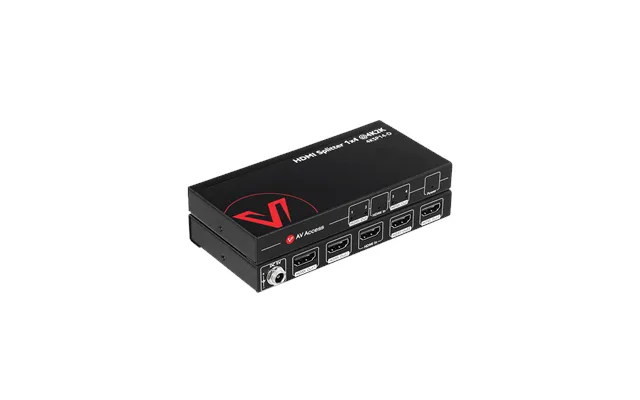
The AV Access 4KSP14-D is a 1-in-4-out HDMI splitter. According to the reference data, it distributes one HDMI input signal to four outputs and supports resolutions up to 4K at 30Hz. That makes it a product to consider for setups where one source needs to feed several compatible displays.
A splitter may suit a presentation area, a home theater with multiple screens, or a space where one media source needs to reach several televisions. The key question is simple: do you want one source displayed in more than one place?
If the answer is yes, the AV Access 4KSP14-D offers the relevant configuration. It follows HDMI 1.4a and HDCP 1.4 specifications, according to the supplied product details. It also supports PCM 2.0, PCM 5.1, PCM 7.1, Dolby TrueHD, and DTS-HD Master Audio.
An HDMI switch works in the opposite direction. Instead of sending one source to several outputs, it lets you connect multiple HDMI sources to one display. You then select which source appears on the screen.
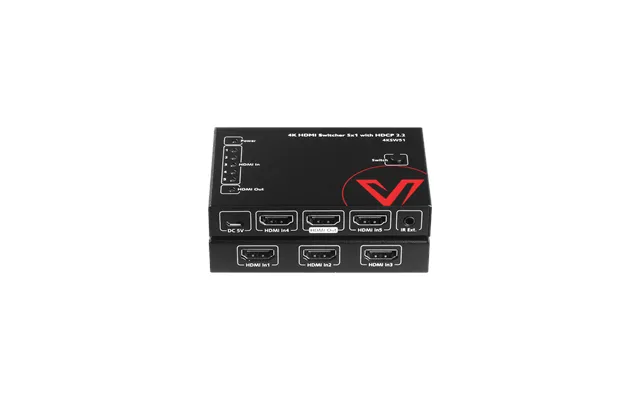
The AV Access 4KSW51 is a 5-in-1-out HDMI switch. It accepts up to five HDMI input sources and sends the selected signal to one output. This can help when your television or monitor has fewer HDMI ports than your devices require.
A five-input switch gives you room to connect several sources without repeatedly unplugging cables. The AV Access 4KSW51 supports resolutions up to 4K at 60Hz, with 4:2:0 and 8-bit support listed in the reference data. It is also HDCP 2.2 compliant.
The switch provides several ways to change inputs. You can use the included IR remote, press the button on the top panel, or use its auto-switch function. That flexibility is helpful when you want quick control from the couch but still prefer a physical button when you are standing near the equipment.
The AV Access 4KSP14-D is the most suitable option among these listings for distributing one HDMI signal across multiple outputs. Its 1-in-4-out design clearly separates it from the 4KSW51 switch, which is designed for source selection rather than signal duplication.
Its listed price is $35.99. The reference data identifies the brand or model as 4KSP14-D and lists AV Access as the store. The product description also mentions auto EDID and a high-quality threaded power supply.
Audio compatibility matters because a video device is only part of the viewing experience. The AV Access 4KSP14-D supports several PCM formats, including 2.0, 5.1, and 7.1. It also supports Dolby TrueHD and DTS-HD Master Audio, as stated in the product information.
For video, the splitter supports up to 4K at 30Hz. That specification should guide your expectations. If your setup depends on a different resolution or refresh rate, compare the source, splitter, display, and cable capabilities before making a decision.
The AV Access 4KSW51 is designed for a different challenge: too many HDMI sources and not enough display inputs. Its 5-in-1-out design allows up to five sources to connect to one display path.
This model is listed at $35.99. The supplied data identifies AV Access as the store and 4KSW51 as the brand or model reference. Its feature list includes HDCP 2.2 compliance, 4K support at up to 60Hz, auto switching, remote control, and top-panel button control.
Input selection should not feel like a chore. With the 4KSW51, you can choose between remote control and button operation. Auto switching adds another option by helping select an active source, giving you more than one way to manage connected equipment.
This is especially useful if several devices share one television. Instead of reaching behind the display to exchange cables, you can use the switch as a central traffic controller. The device does not create additional content; it simply helps direct the selected HDMI source to the display.
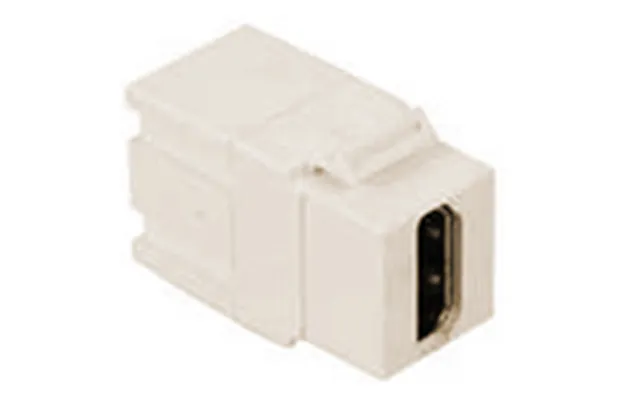
The ICC IC107HDMIV is not a splitter or a multi-input switch. It is an HDMI female-to-female module in an ivory finish. Its purpose is to join two HDMI cables with compatible male connectors, creating a continuous connection between them.
The module is listed at $11.12. The supplied information identifies the brand as ICC and the store as The Twister Group. Because this product serves as a connector rather than an active switching device, it belongs in a different part of your setup-planning checklist.
A female-to-female HDMI module can be useful when an existing cable run is slightly too short and you have another suitable HDMI cable available. It may also help when you want to extend a connection without replacing the original cable.
However, the module does not provide multiple inputs, multiple outputs, remote control, or signal distribution. It is best viewed as a simple connection accessory. If you need to duplicate one source across four displays, choose a splitter. If you need to select one of five sources, choose a switch.
The simplest way to remember the difference is to look at the direction of the signal. A splitter uses one input and sends it to multiple outputs. A switch accepts multiple inputs and sends one selected input to one output.
The AV Access 4KSP14-D has a 1-in-4-out configuration, making it the matching choice for one-source-to-many-display setups. The AV Access 4KSW51 has a 5-in-1-out configuration, making it the matching choice for many-source-to-one-display setups.
The ICC IC107HDMIV sits outside both categories. It connects HDMI cables rather than managing several active sources or displays. Asking what problem you need to solve is often more useful than focusing on the product name alone.
Resolution describes the amount of visual detail a display can show, while refresh rate describes how frequently the image can update. Both specifications can affect whether a product fits your equipment.
The AV Access 4KSP14-D supports up to 4K at 30Hz. The AV Access 4KSW51 supports up to 4K at 60Hz with 4:2:0 and 8-bit support listed. These are different specifications, so compare them with the capabilities of your source and display.
It is tempting to focus only on the splitter or switch, but the entire HDMI path matters. Consider the source device, HDMI cables, splitter or switch, and display as links in one chain. The chain performs according to its compatible components and connections.
Before buying, write down the devices you plan to connect and the display format you expect to use. This small step can prevent a mismatch and make it easier to compare the listed specifications with your actual needs.
HDCP is a content-protection standard used in HDMI connections. In practical terms, compatibility between connected devices can affect whether protected content displays correctly.
The AV Access 4KSP14-D follows HDCP 1.4, while the AV Access 4KSW51 is HDCP 2.2 compliant. Those details are important when you are comparing the two products. They should be considered alongside the source device and display rather than treated as isolated features.
If your equipment uses a particular HDCP version, check the specifications of every connected component. A little planning here can save you from discovering a compatibility issue after the cables are already arranged.
Start with the direction of your setup. If one source must reach several displays, the AV Access 4KSP14-D is the relevant product type in this comparison. If several sources must share one display, the AV Access 4KSW51 is the more appropriate type.
If you only need to join two HDMI cables, the ICC IC107HDMIV may be the more focused solution. Its lower listed price of $11.12 also places it in a different category from the two AV Access products, both of which are listed at $35.99.
How many input devices do you have? How many displays need the same signal? Do you need a remote? What resolution and refresh rate do your devices support? Which HDCP standard is relevant to your setup?
These questions act like a map. They help you avoid choosing a product because it sounds impressive when another product actually matches your wiring needs. A good HDMI accessory should fit your system, not force your system into an awkward arrangement.
Plan the cable path before connecting everything. Place the splitter or switch where the HDMI cables can reach without sharp bends or unnecessary strain. Labeling each source cable can also make future input changes much easier.
For the AV Access 4KSP14-D, connect the single HDMI source to the input and route the outputs toward the intended displays. For the AV Access 4KSW51, connect each source to an input and connect the output to the display path. For the ICC module, connect compatible HDMI cables to its two female ports.
After connecting the equipment, test one device or display at a time. This approach works like checking stepping stones across a stream: if something fails, you know which connection to inspect instead of troubleshooting the entire system at once.
The comparison data shows two AV Access products at $35.99 each and one ICC module at $11.12. The similar prices of the AV Access models do not mean they serve the same purpose. Their input and output arrangements are the important distinction.
The 4KSP14-D focuses on distribution, with one HDMI input and four outputs. The 4KSW51 focuses on selection, with five inputs and one output. The ICC IC107HDMIV is a compact connection module for joining HDMI cables.
Use the product descriptions and technical details as a starting point for your comparison. Since ZoneOffer is not a store, review the available listing information and match the product specifications to your own equipment before deciding.
HDMI splitters, switches, and couplers may look similar at a glance, but each solves a different connection problem. The AV Access 4KSP14-D is built to distribute one HDMI source to four outputs, while the AV Access 4KSW51 lets you manage five sources through one output with remote, button, and auto-switching options. The ICC IC107HDMIV provides a straightforward female-to-female HDMI connection. By identifying your signal direction, checking resolution and HDCP compatibility, and comparing the listed prices on ZoneOffer, you can choose a more suitable addition to your setup.