


View 4 Offers
View 4 Offers
Loading...
Satellite radio accessories can make a big difference in how smoothly your audio system works. The right cable may connect an older receiver to an auxiliary input, while a compatible module can add satellite radio functionality to a marine entertainment system. An antenna, meanwhile, helps support satellite weather or radio reception where a clean signal matters.
This guide explores four products listed in the Satellite Radio Accessories category. The selection includes an auxiliary adaptor cable from JL AUDIO, a programming cable from STANDARD HORIZON, a Sirius satellite radio module from Fusion, and a satellite weather radio antenna from Garmin. ZoneOffer is a comparison site, so you can use the listed information to compare options rather than treating the site as a retailer.
A satellite radio setup is often more than a receiver. It can include a tuner, antenna, connector, cable, control interface, and compatible audio equipment. If one part does not match the rest, the entire setup may feel like a puzzle with one missing piece.
Accessories help bridge those gaps. A conversion cable can connect a specialized SiriusXM connector with analog auxiliary inputs. A programming cable can support communication between a computer and a compatible radio. A satellite module can expand an existing system, while an antenna can serve as an important component for satellite weather information.
Before choosing any product, think about the role you need it to play. Are you trying to route audio into another device? Do you need a programming connection? Are you upgrading a Fusion marine system? Or are you looking for a Garmin satellite weather antenna? Starting with the purpose keeps your search focused.
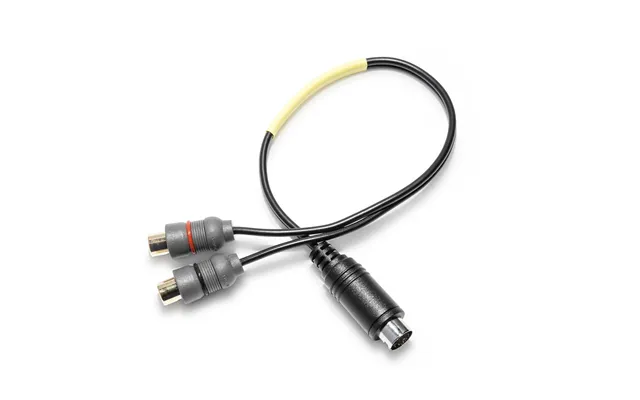
The JL AUDIO 010-13857-00 MMC-SXM AUX adaptor cable is designed to convert a Mediamaster radio SiriusXM connector into a pair of analog auxiliary inputs. The listed product has a black cable with a black and gray connector, giving it a straightforward appearance for compatible audio installations.
At the time represented in the reference data, this cable is listed at $28.12 through The Twister Group. The reference data identifies the brand as JL AUDIO. Because this is a connection accessory, its value comes from solving a specific compatibility problem rather than adding a large standalone feature set.
Think of this adaptor as a translator. It is intended to help a Mediamaster radio SiriusXM connector communicate with a pair of analog auxiliary inputs. That can be useful when your audio setup includes an auxiliary input but does not use the same connector format as the satellite radio equipment.
The cable may appeal to listeners who want a direct, uncomplicated connection between compatible components. Instead of replacing an entire system, an adaptor can provide a practical link between existing hardware. It is a small accessory, but the right small accessory can prevent a much larger installation headache.
The product description specifically states that this cable is not compatible with the MM80-HR radio. That detail should be treated as essential, not optional. Verify your radio model and connector arrangement before purchasing, especially if you are working with Mediamaster equipment.
Fitment is the key question here: does your system use the supported Mediamaster SiriusXM connector, and does it provide the expected analog auxiliary inputs? If the answer is unclear, compare the product details with your equipment documentation before making a decision.
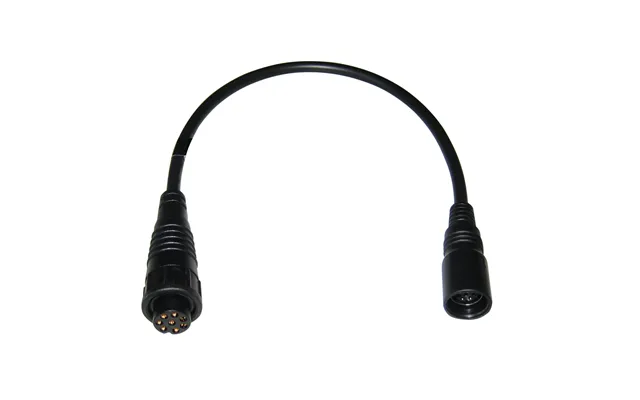
The STANDARD HORIZON CT-99 PC programming cable is listed for all current fixed-mount radios from Standard Horizon. It is intended to connect compatible radio equipment with a computer for programming-related tasks.
The listed price is $24.12 through The Twister Group, and the reference data identifies STANDARD HORIZON as the brand. Compared with a satellite receiver module or weather antenna, this is a more specialized accessory. Its usefulness depends on whether you own a compatible fixed-mount radio and need the appropriate computer connection.
Programming cables are practical tools for equipment configuration. They can help create a connection between a computer and compatible radio hardware, making them relevant for users who need to manage settings or perform supported programming tasks.
The key is to match the cable to the radio family it is designed for. The product description identifies the CT-99 as suitable for all current fixed-mount radios from Standard Horizon. That makes the model and brand pairing especially important during comparison.
When reviewing a programming cable, check the radio model first. A cable can look similar to another cable while serving a different purpose. You should also consider whether your setup requires a PC connection at all. If your goal is simply to route SiriusXM audio into auxiliary inputs, the JL AUDIO adaptor serves a different role.
In other words, do not choose based on appearance alone. Choose according to the task. The CT-99 is for a compatible programming connection, while the JL AUDIO product is an audio adaptor. They belong to the same broad accessory category, but they solve different problems.
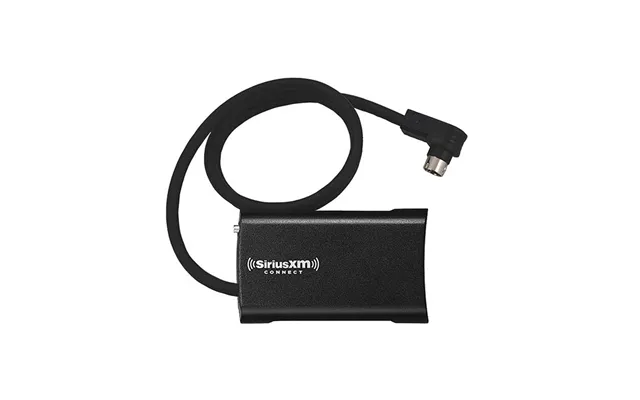
The Fusion 0101277300 Sirius SVX300 is listed as a satellite radio module for the Fusion 650 and 750 series. At $113.12 through The Twister Group, it sits between the two cable options and the Garmin antenna in the listed price range.
This product is designed for users who have a compatible Fusion system and want the corresponding Sirius satellite radio module. The reference data identifies Fusion as the brand and specifically connects the module with the 650 and 750 series. That series information should guide your compatibility check.
A module can act like an added engine for an existing entertainment system. Rather than functioning as a simple cable, it is a hardware component intended to support satellite radio capability in a compatible Fusion setup.
If you already use a Fusion 650 or 750 series system, this product may be the type of accessory worth investigating. The important question is not simply whether you want satellite radio. It is whether your particular Fusion equipment belongs to the supported series named in the product description.
Compatibility should come before price. The listing identifies the Sirius SVX300 for the 650 and 750 series, so compare that information with your equipment model. A module intended for one product family may not be appropriate for another, even when both systems come from the same manufacturer.
It is also useful to separate the module from the rest of your installation. You may need other compatible components for a complete satellite radio setup, but the reference data only confirms the module’s stated purpose. Avoid assuming that the listed module automatically includes cables, antennas, subscriptions, or other equipment unless those details are specifically provided.
The Garmin 010-02277-00 GXM 54 is a satellite weather radio antenna. With a listed price of $649.99 through The Twister Group, it is the highest-priced item in this selection.
The product is associated with Garmin and is identified as the GXM 54 satellite weather radio antenna. Unlike the JL AUDIO cable or STANDARD HORIZON programming cable, this accessory is focused on antenna hardware for a satellite weather radio application.
An antenna is the listening point of a radio system. It supports the connection between the equipment and the relevant signal environment, making it an important part of a satellite weather radio setup.
If you are comparing antennas, focus on the exact model and intended use. The Garmin listing gives you a clear starting point: the product is the GXM 54 satellite weather radio antenna. That information helps distinguish it from general-purpose audio cables and satellite radio modules.
The price difference between this antenna and the cable accessories is substantial, so careful comparison is sensible. A higher price does not automatically mean a product is right for every system. It may instead reflect a different type of hardware and a more specialized application.
Before selecting the GXM 54, confirm that your equipment calls for this Garmin antenna. You should also review the rest of your setup to determine whether the antenna is the missing component. Matching the antenna to the intended radio system is more important than comparing price alone.
These four products can be grouped by function. The JL AUDIO 010-13857-00 is an adaptor cable for converting a Mediamaster radio SiriusXM connector into analog auxiliary inputs. The STANDARD HORIZON CT-99 is a PC programming cable for current fixed-mount radios from Standard Horizon. The Fusion 0101277300 is a Sirius SVX300 satellite radio module for the 650 and 750 series. The Garmin 010-02277-00 is a GXM 54 satellite weather radio antenna.
The listed prices range from $24.12 to $649.99. The STANDARD HORIZON cable is listed at $24.12, the JL AUDIO cable at $28.12, the Fusion module at $113.12, and the Garmin antenna at $649.99. These figures are the prices shown in the supplied reference data and may be useful for initial comparison.
However, price should follow compatibility. Buying a low-cost cable that cannot connect to your equipment is like buying a key for the wrong lock. The least expensive option is only useful when it fits the job.
Write down the make and model of your current radio or audio system. This simple step can quickly narrow the field. The JL AUDIO listing includes a specific incompatibility warning, the Fusion listing names the 650 and 750 series, and the STANDARD HORIZON listing refers to current fixed-mount radios.
Next, describe the problem in plain language. Do you need to convert a connector to auxiliary inputs? Do you need to program a fixed-mount radio from a computer? Do you need a satellite radio module for a Fusion system? Or do you need a satellite weather radio antenna?
Once the task is clear, the product category becomes easier to understand. Cables connect. Modules add system hardware. Antennas support signal reception. Keeping those roles separate prevents accidental mismatches.
Use the product description as your checklist. Look for the named radio series, connector type, stated application, and any compatibility warning. If a detail is not provided, do not assume it is included or supported.
ZoneOffer lets you compare the listed products and information in one place, but it is not a store. Treat the displayed offer details as comparison information and verify suitability before purchasing from the listed source.
Installation depends on the type of accessory. A cable generally requires correct connector alignment and a compatible destination input. A programming cable requires a supported radio and computer connection. A module may require integration with the appropriate Fusion series, while an antenna may need placement and connection suited to the radio system.
Take your time with labeling and connector checks. If you force a connection, you risk damaging equipment or creating a problem that the accessory was meant to solve. A careful setup is usually faster than troubleshooting an avoidable mismatch later.
You should also keep your system organized. Labeling cables and recording the equipment models can make future upgrades easier. Think of it as creating a map for your audio setup: when every component has a clear role, the route from source to sound becomes easier to follow.
The JL AUDIO cable is best considered by someone who needs the stated Mediamaster SiriusXM-to-auxiliary conversion and has checked the compatibility requirements. The STANDARD HORIZON cable is aimed at users of compatible current fixed-mount radios who need a PC programming connection.
The Fusion module is relevant to owners of Fusion 650 or 750 series equipment seeking the listed Sirius SVX300 module. The Garmin antenna is intended for a satellite weather radio application involving the GXM 54 model.
These are not interchangeable accessories. Each one is like a different tool in a toolbox: a screwdriver may be excellent, but it cannot replace a wrench. Match the product to the specific task, equipment family, and connection requirements.
The right satellite radio accessory can improve compatibility, expand system capability, or support a cleaner installation. In this selection, the JL AUDIO 010-13857-00 focuses on Mediamaster SiriusXM connector conversion, the STANDARD HORIZON CT-99 supports PC programming for compatible fixed-mount radios, the Fusion 0101277300 adds the listed Sirius SVX300 module for 650 and 750 series systems, and the Garmin 010-02277-00 provides a GXM 54 satellite weather radio antenna. Compare the function, model details, compatibility notes, and listed prices carefully so you can choose the accessory that genuinely fits your setup.